How to Change a Grafana Legend Name: 4 Ways and the Traps
A Prometheus query in Grafana gives you legend entries like
demo_up{env="prod-eu", instance="web-01.example.com:9100", job="node"}. There are at
least four places where you can turn that into something readable, and they don’t
all work the same way. Some of them overwrite each other. Some fail without an error
and just show the long name again.
I built one test dashboard with 32 panels on Grafana 13.2.3 and
Prometheus 3.14.0. 28 of them run the same query, demo_up{job="node"}; the other 4
read a small CSV from the TestData data source. The query returns five
series with the labels instance, env and job:
| instance | env |
|---|---|
| web-01.example.com:9100 | prod-eu |
| web-02.example.com:9100 | prod-eu |
| db-01.example.com:9100 | prod-us |
| web-03.example.com:9100 | prod-us |
| 10.0.0.5:9100 | staging |
Each panel changes one setting. The screenshots below are cropped to the panel title and the legend.
Short answer (Grafana 13.2.3, tested 2026-09-30):
| You want | Use | Watch out for |
|---|---|---|
| One label as the name | Query options → Legend → Custom, {{instance}} | A wrong label name, or wrong case, gives you the full series name, not an empty one |
| Several labels plus text | Legend {{instance}} ({{env}}) | ${__field.labels.env} does not work in this box |
| The same name pattern for every series, set in the panel | Standard options → Display name, e.g. ${__field.labels.instance} | It replaces the legend for all series |
| A new name for one series | Override → Fields with name → Display name | The name you pick must match the name shown right now |
| Cut part of the name (domain, port) | Transformations → Rename by regex | Without /…/ the pattern has to match the whole name |
1. The Legend box on the query
Under the Prometheus query, Options → Legend has three modes. The Grafana docs
(Prometheus query editor,
read 2026-09-30) describe Auto as “unique labels only”, Verbose as all label
names, and Custom as label templates like {{hostname}}.
What I got:
| Legend setting | Legend entry for the first series |
|---|---|
| empty | demo_up{env="prod-eu", instance="web-01.example.com:9100", job="node"} |
Auto (__auto) | {env="prod-eu", instance="web-01.example.com:9100"} |
{{instance}} | web-01.example.com:9100 |
{{ instance }} (spaces) | same as above |
{{instance}} ({{env}}) | web-01.example.com:9100 (prod-eu) |
{{__name__}} | demo_up for all five |
CPU (plain text) | CPU for all five |
Auto dropped job, because it has the same value on all five series, and it dropped
the metric name too.
Trap: a typo doesn’t give you an empty name
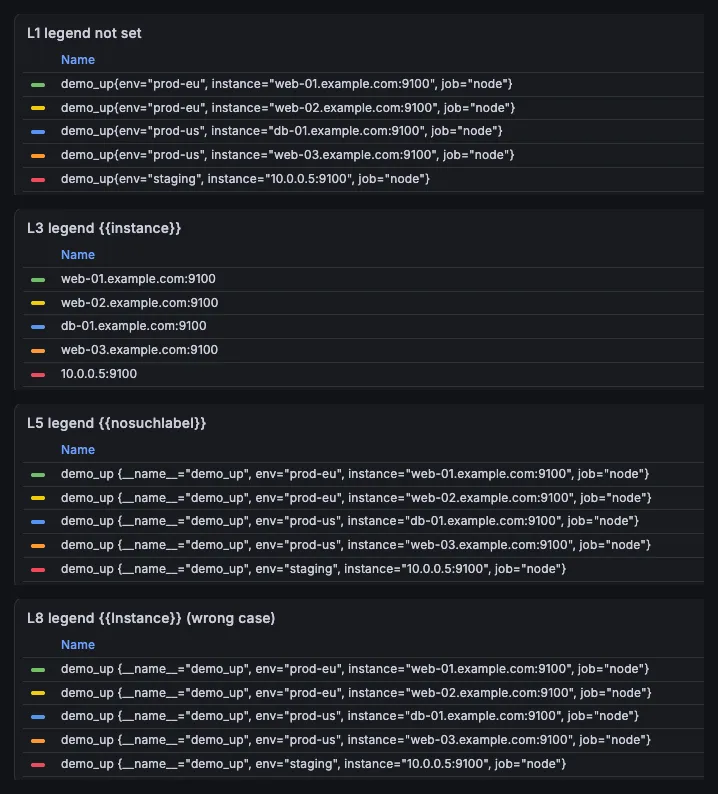
With {{nosuchlabel}} (a label that doesn’t exist) and with {{Instance}} (right
name, wrong case), the legend didn’t turn empty. It fell back to the full series name.
That makes it look like the Legend setting was ignored.
The fallback is not quite the same as the default, though. It has a space after
demo_up and an extra __name__="demo_up" label (bottom two panels above). If you
see __name__ in your legend, a label name in your template is wrong. Label names
are case-sensitive.
2. Display name (Standard options)
Standard options → Display name sets the name of every field in the panel. The
standard options docs
(read 2026-09-30) list the variables it accepts, such as ${__field.labels.X} and
${__field.name}.
${__field.labels.env} works here, but not in the Legend box
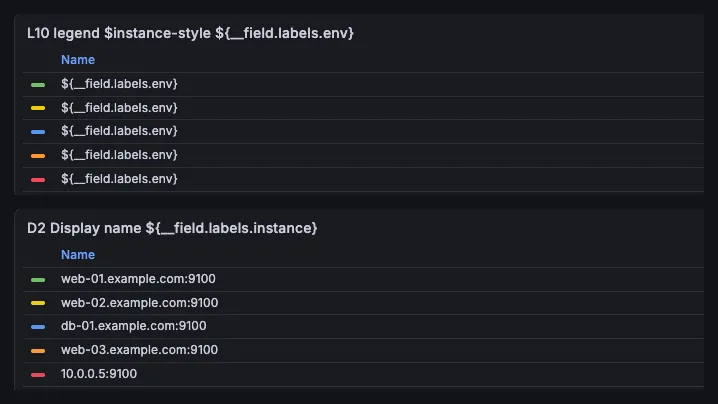
Put ${__field.labels.env} in the query’s Legend box and Grafana prints it as it is,
five times. Put the same kind of expression in Display name and it’s replaced by the
label value. The Legend box takes {{label}}; Display name takes ${__field.…}.
Display name wins over the Legend box
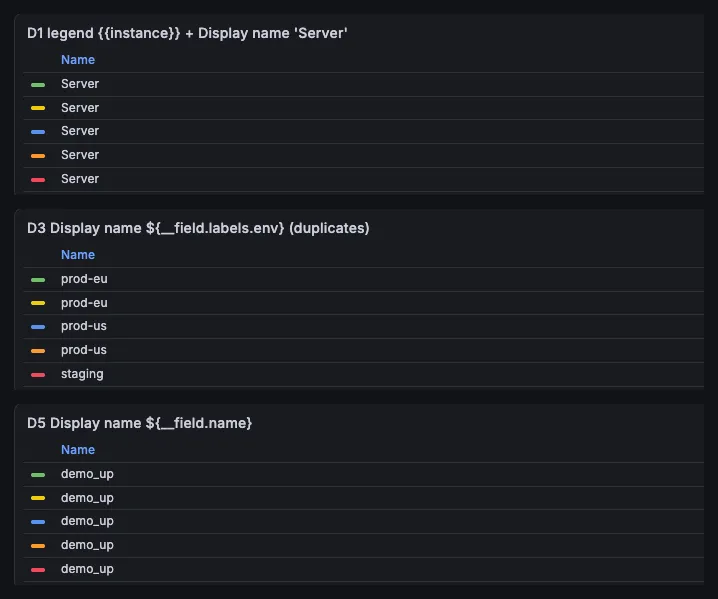
- With Legend
{{instance}}and Display nameServer, all five series were called Server. Display name is not a fallback; it replaces the legend. - Duplicate names are allowed.
${__field.labels.env}gave prod-eu twice and prod-us twice. Grafana still drew five lines with five different colors, but you can’t tell them apart in the legend. ${__field.name}gave demo_up for every series, even with Legend{{instance}}set. It’s the field name, not the legend result.${__series.name}and${__field.displayName}gave the same names as the Legend box (web-01.example.com:9100and so on).
My rule: use the Legend box when the name comes from labels, and leave Display name empty. Use Display name only when you want the same pattern on every panel field, or when your data source has no legend option.
3. Overrides: rename one series
To rename a single series, add an override: Add field override → Fields with name, pick the series, then Add override property → Standard options → Display name.
The name has to match what is shown now
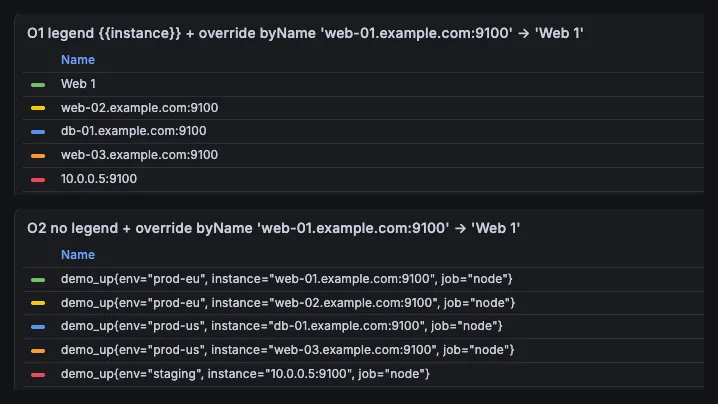
With Legend {{instance}}, an override on web-01.example.com:9100 renamed that
series to Web 1 (top). Remove the Legend setting and the same override does
nothing, because the series is now called
demo_up{env="prod-eu", instance="web-01.example.com:9100", job="node"} (bottom).
It works the same way with Display name. With Display name All set on the panel, an
override on web-01.example.com:9100 did nothing; all five series showed All. An
override on the name All changed all five.
So if you change the Legend setting after adding overrides, check the overrides again.
Regex overrides can’t use capture groups
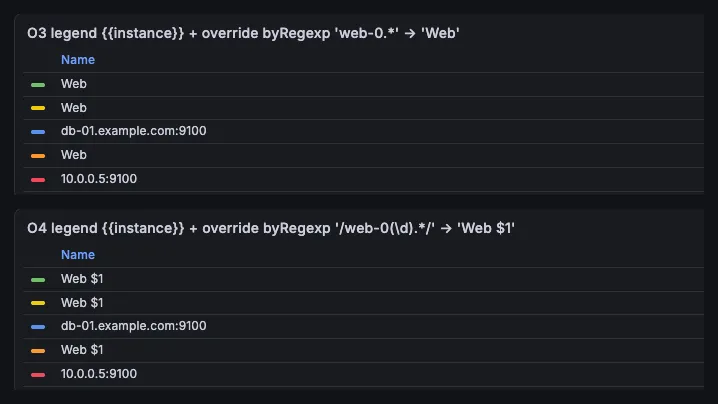
Fields with name matching regex plus a Display name gives every matching series
the same fixed name (top). I tried to keep the number with /web-0(\d).*/ and
Web $1. The legend showed Web $1, literally, three times (bottom). The
overrides docs
(read 2026-09-30) point to Rename by regex for renaming. That’s the next section.
4. Rename by regex (transformation)
Transformations → Add transformation → Rename by regex takes a regex and a
replacement that can use $1. It worked on both kinds of names I tried:
| Legend | Regex → replacement | Result |
|---|---|---|
{{instance}} | (.*)\.example\.com:9100 → $1 | web-01, web-02, db-01, web-03, 10.0.0.5:9100 |
| empty | .*instance="([^.]+).* → $1 | web-01, web-02, db-01, web-03, 10 |
The first row left 10.0.0.5:9100 alone, because it doesn’t match. The second row
cut 10.0.0.5 at the first dot: [^.]+ is fine for host names but wrong for IP
addresses. Test your pattern against every series, not only the first one.
Without slashes, the regex must match the whole name
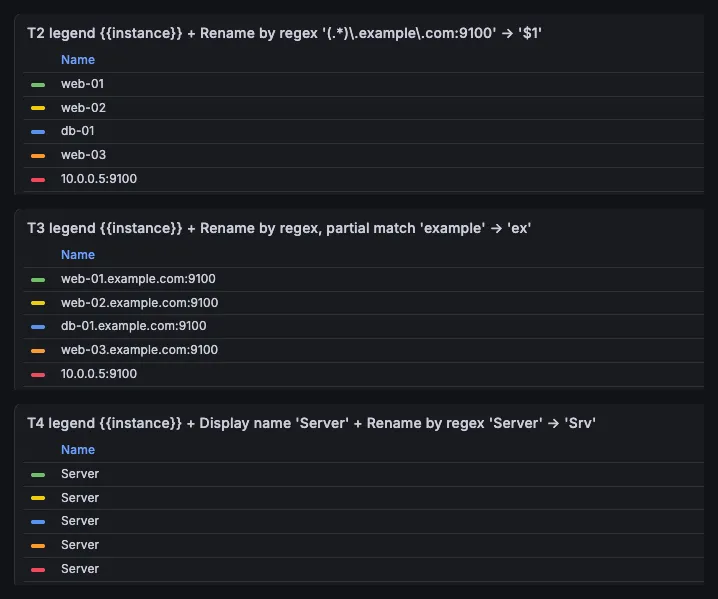
I tried to shorten example to ex with the pattern example. Nothing changed
(middle panel). The pattern was compared with the whole name, and no series is
called just “example”.
The docs don’t say this in plain words. The source does: in Grafana v13.2.3,
stringToJsRegex() in packages/grafana-data/src/text/string.ts turns a pattern
without slashes into ^pattern$:
if (!stringStartsAsRegEx(str)) {
  return new RegExp(`^${str}$`);
}
A pattern in slashes, like /example/, is used as written, with optional flags. The
docs’ own Rename by regex example is written that way: /^([^.]+).*/. I tested the
slash form in value mappings, where it did match part of the text; see my
value mappings article. I did not test the
slash form in Rename by regex in this batch.
Display name on the panel beats Rename by regex
With Display name Server on the panel and Rename by regex Server → Srv, all five
series still said Server (bottom panel above). The panel’s Display name
won over the transformation. If Rename by regex seems to do nothing, check that
Display name is empty.
5. Not for tables
A table panel with Format: Table on the Prometheus query ignored the Legend
setting {{instance}}. The labels became columns (__name__, env, instance,
job) next to Time and Value. In a table, you rename columns with Organize fields
or overrides, not with the legend.
What I’d do
- Start with the Legend box on the query (
{{instance}}or Auto). It’s the simplest option and keeps each query’s names next to the query. - If you see
__name__in the legend, you mistyped a label. Check the spelling and the case. - Set up overrides last. They match the name that is shown when they run, so changing the Legend setting or Display name afterwards can make them silently stop matching.
- Use Rename by regex for trimming (domains, ports), and make the pattern match the whole name, or put it in slashes.
What this test does not cover
- Only Grafana OSS 13.2.3 in Docker, tested 2026-09-30, with Prometheus 3.14.0 and the TestData data source. I built the panels from dashboard JSON through the Grafana HTTP API and checked the rendered panels. I didn’t click through every editor screen.
- Tried on one panel only, not repeated: whether an override on the original field name still matches after Organize fields has renamed the field. On that one panel it did, so I don’t build on it here.
- Not tested in this batch: Rename by regex with a pattern in slashes (
/…/). - Other data sources (Loki, InfluxDB, SQL). Their legend options are different.
- Grafana Cloud and older self-hosted versions.