Typst Table Caption on Top: Continued Pages and Table 2.1
Typst puts every figure caption below its content by default. Many style guides want table captions on top, and figure captions below. The one-line fix is already in the figure docs (read 2026-09-25):
#show figure.where(kind: table): set figure.caption(position: top)That part works. What the docs don’t cover are the questions that come next on the forums: does it still work when the table is wrapped in something, what happens when the table breaks across pages, and how do you get “Table 2.1” instead of “Table 3”. I compiled each case with the official Typst CLI, 0.15.1 (current release) and 0.14.2. Both gave the same output in every test below.
Short answer (Typst 0.15.1 and 0.14.2, tested 2026-09-25):
| You want | Use | Watch out for |
|---|---|---|
| Table captions on top, image captions below | #show figure.where(kind: table): set figure.caption(position: top) | Nothing. It also held when the table was wrapped in align or a content block with a set rule |
| Caption on every page of a long table | A header cell that shows “Table 1 (continued)” only after the first page (code below) | The caption itself appears once. Give the extra cell inset: 0pt, or page 1 gets a blank gap |
| “Table 2.1” style numbers | A numbering function plus a counter reset at each level 1 heading | Without the reset, the first table of chapter 2 came out as “Table 2.3”. Tables before the first heading become “Table 0.1” |
| Left-aligned long captions | #show figure.caption: set align(left) | Wrapped caption lines are centered by default |
Test 1: wrapped tables are still tables
The figure docs say the kind is detected “based on the type of its body”. I expected that wrapping the table would break the detection, so the caption would fall back to the bottom and the table would be counted as a Figure. I tried the usual wrappers:
#show figure.where(kind: table): set figure.caption(position: top)

#figure(table(columns: 2, [a], [1], [b], [2]), caption: [Plain table])
#figure(align(center, table(columns: 2, [a], [1], [b], [2])), caption: [Table inside align])
#figure([#set text(size: 8pt); #table(columns: 2, [a], [1], [b], [2])], caption: [Table after set text])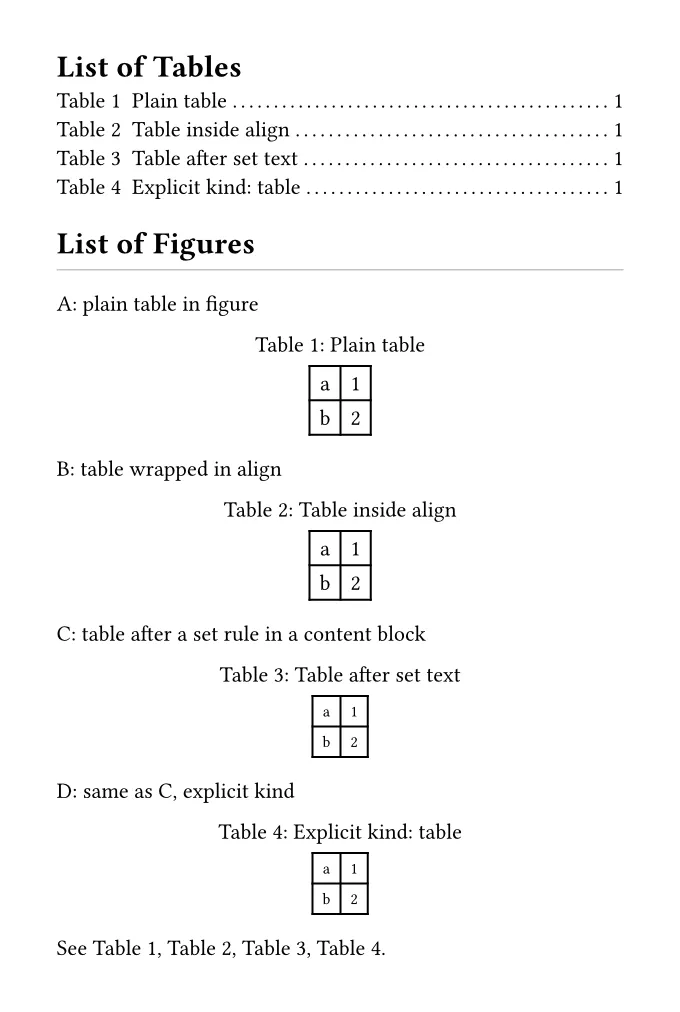
All of them became tables. The captions went on top, the numbers ran Table 1 to
Table 4, all four appeared in a “List of Tables” outline, and the “List of Figures”
stayed empty. I got the same result with kind: table set explicitly. So if your
captions are still at the bottom, the wrapper is probably not the reason. Check
that the show rule comes before the figures, and that the figure’s body contains a
real table, not an image of one.
Test 2: a long table that breaks across pages
The docs show how to let a figure break across pages:
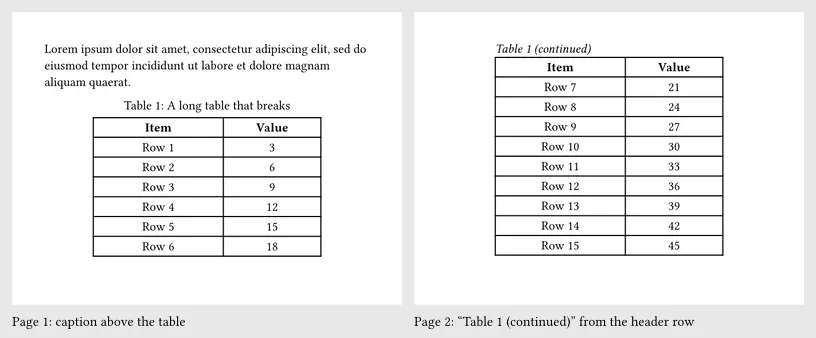
#show figure: set block(breakable: true)With the caption on top, the result looks like this: page 1 has “Table 1: A long
table that breaks” above the table. Pages 2 and 3 have the table’s header row
(because I used table.header) but no caption. Readers who land on page 2 can’t
tell which table they are looking at.
There’s no built-in “continued” caption. What worked for me is an extra header row that only prints something when it isn’t on the page where the figure starts:
#show figure.where(kind: table): set figure.caption(position: top)
#show figure: set block(breakable: true)

#let continued = context {
  let fig = query(figure.where(kind: table).before(here())).last()
  if fig.location().page() != here().page() {
    pad(bottom: 4pt, emph[#fig.supplement #fig.counter.display(fig.numbering) (continued)])
  }
}

#figure(
  table(
    columns: (4cm, 3cm),
    table.header(
      table.cell(colspan: 2, stroke: none, inset: 0pt, align: left, continued),
      [*Item*], [*Value*],
    ),
    ..range(1, 25).map(i => ([Row #i], [#(i * 3)])).flatten(),
  ),
  caption: [A long table that breaks],
)
Two things I had to fix on the way:
- The
inset: 0ptmatters. My first version used the default cell inset. On page 1, where the row is empty, it still took up space, so there was a visible gap between the caption and the table, and the table ran onto a fourth page. Withinset: 0ptand the spacing moved intopad, the header on page 1 sits exactly where it does without the extra row (I measured the “Item” text at the same y position, 94.21pt, in both PDFs), and the table fits on 3 pages again. - Narrow tables wrap the label. With two
autocolumns the text broke into “Table 1” / “(continued)” on two lines. Fixed column widths, as above, or a shorter label avoid that.
Test 3: “Table 2.1” numbering per chapter
The answer that keeps coming up in the Typst forum is a numbering function that prepends the heading number, plus a counter reset in a level 1 heading show rule. Both parts are needed:
#set heading(numbering: "1.")
#show figure.where(kind: table): set figure.caption(position: top)
#set figure(numbering: (..num) =>
  numbering("1.1", counter(heading).get().first(), num.pos().first()))
#show heading.where(level: 1): it => {
  counter(figure.where(kind: table)).update(0)
  counter(figure.where(kind: image)).update(0)
  it
}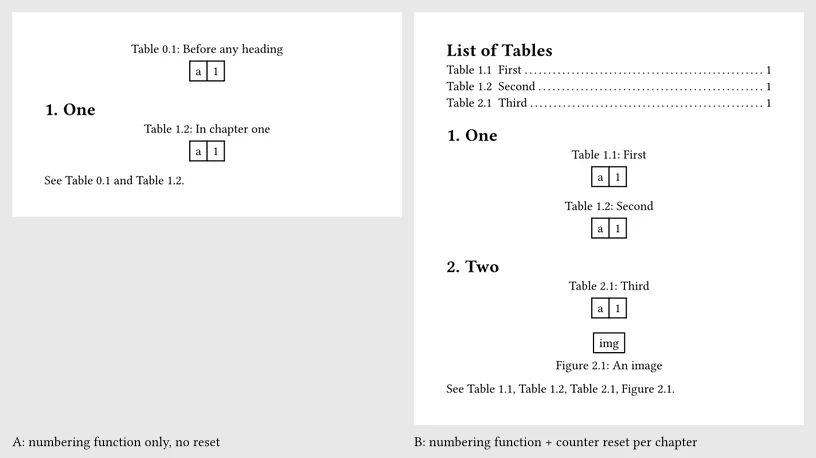
With both parts (right), the outline, the captions and the references all agree: “See Table 1.1, Table 1.2, Table 2.1, Figure 2.1.” Images and tables keep separate counters, so the first image in chapter 2 is Figure 2.1.
With only the numbering function (left), two things go wrong without any warning:
- A table placed before the first heading becomes Table 0.1, because the
heading counter is still 0 there. That’s typical for a table on a title page or in
an abstract. Give those figures
numbering: none, or move them after the first heading. - The table counter never restarts. In the left render, the table before the heading already used number 1, so the first table in chapter 1 is Table 1.2. In a separate test without any table before the first heading, chapter 1 was fine (1.1, 1.2), but the first table in chapter 2 came out as Table 2.3. The prefix changes, the second number just keeps counting.
If you number headings at a second level too, keep in mind that
counter(heading).get().first() only takes the chapter number. That is what I
wanted here. I didn’t test “Table 2.3.1” style numbers.
Test 4: long captions are centered line by line
A caption that wraps is centered line by line, so the second line starts indented. Some style guides want captions left-aligned:
#show figure.caption: set align(left)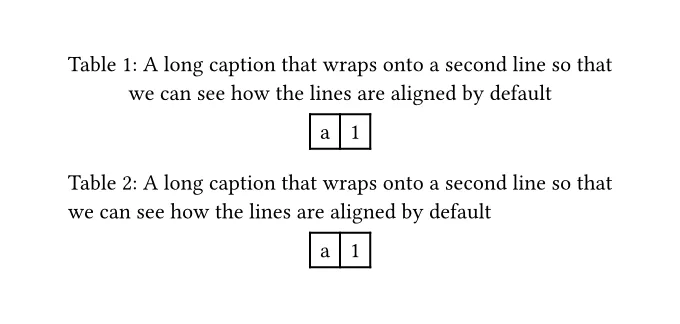
The second line moved from x = 64.19pt to 33.92pt, the same left edge as the first line. The table itself stays centered.
What I’d do
- Use the show-set rule from the docs for table captions. Don’t rewrite your tables to “fix” detection. Wrappers didn’t break it in my tests.
- For tables longer than a page, add the “continued” header cell with
inset: 0pt, and usetable.headerso the column titles repeat as well. - For per-chapter numbers, always pair the numbering function with the counter reset, and check the first pages of the document for a stray “0.1”.
What this test does not cover
- Only the official macOS (Apple Silicon) CLI builds of Typst 0.15.1 and 0.14.2, tested 2026-09-25. I didn’t test the web app.
- Quarto. Several forum threads ask about this with Quarto’s
format: typst. I didn’t have Quarto installed, so I can’t tell you how Quarto passes table captions to Typst. The rules above are plain Typst and belong in the Typst template. - Tables from packages, figures with
placement: top/bottom(floating), and two-column layouts. - PDF output only, no HTML export.