Typst Line Spacing and Paragraph Spacing Not Working
“I set the line spacing and nothing changed” is a common complaint about Typst’s
par function. The two parameters involved, leading and spacing, sound like
they should both be “line spacing”, and the
par reference page (read
2026-09-29) does define both, correctly. What it doesn’t say is where each one
stops working: leading can look completely dead if your paragraphs are one line
long, and spacing can look completely dead inside a tight list or right after a heading.
I compiled every case below with the official Typst CLI, 0.15.1 (current release) and 0.14.2, and measured the exact vertical gap between lines in the rendered PDF (in points) with a small Python script using PyMuPDF. Both versions produced identical numbers in every test.
Short answer (Typst 0.15.1 and 0.14.2, tested 2026-09-29):
| You want | Use | Watch out for |
|---|---|---|
| More/less space between wrapped lines inside one paragraph | #set par(leading: ...) | Has zero effect if the paragraph is only one line, which is common with short, blog-style paragraphs |
| More/less space between two paragraphs | #set par(spacing: ...) | Doesn’t touch the line spacing inside a paragraph at all |
| More/less space between bullet or numbered list items | #set list(spacing: ...) / #set enum(spacing: ...) | #set par(spacing: ...) has no effect on a tight list (items on back-to-back lines), which falls back to par’s leading. A loose list, with a blank line between items, does use par’s spacing |
| More/less space between a heading and the paragraph right after it | #show heading: set block(below: ...) | #set par(spacing: ...) had no measurable effect on this gap in any variant I tried (heading levels 1 to 3, em and pt units, with and without a heading show rule) |
Test 1: leading and spacing are two separate knobs
I compiled four versions of the same two paragraphs (the first one long enough to wrap across five lines on a 9cm-wide page, the second one short):
#set page(width: 9cm, height: 22cm, margin: 1.2cm)
#set text(size: 10pt, font: "New Computer Modern")

#lorem(28)

#lorem(10)
Page 1 is the default. Page 2 adds #set par(leading: 1.5em) only. Page 3 adds
#set par(leading: 0.65em, spacing: 3em) (spacing raised, leading back to
default). Page 4 raises both.
$ typst compile leading_vs_spacing.typ leading_vs_spacing.pdf
EXIT:0
Measuring the y-position of each line with PyMuPDF and taking the difference between consecutive lines:
| Page | leading | spacing | Gap between wrapped lines | Gap between paragraphs |
|---|---|---|---|---|
| 1 (default) | 0.65em | 1.2em (default) | 13.33pt | 18.83pt |
| 2 | 1.5em | default | 21.83pt | 18.83pt (unchanged) |
| 3 | default | 3em | 13.33pt (unchanged) | 36.83pt |
| 4 | 1.5em | 3em | 21.83pt | 36.83pt |
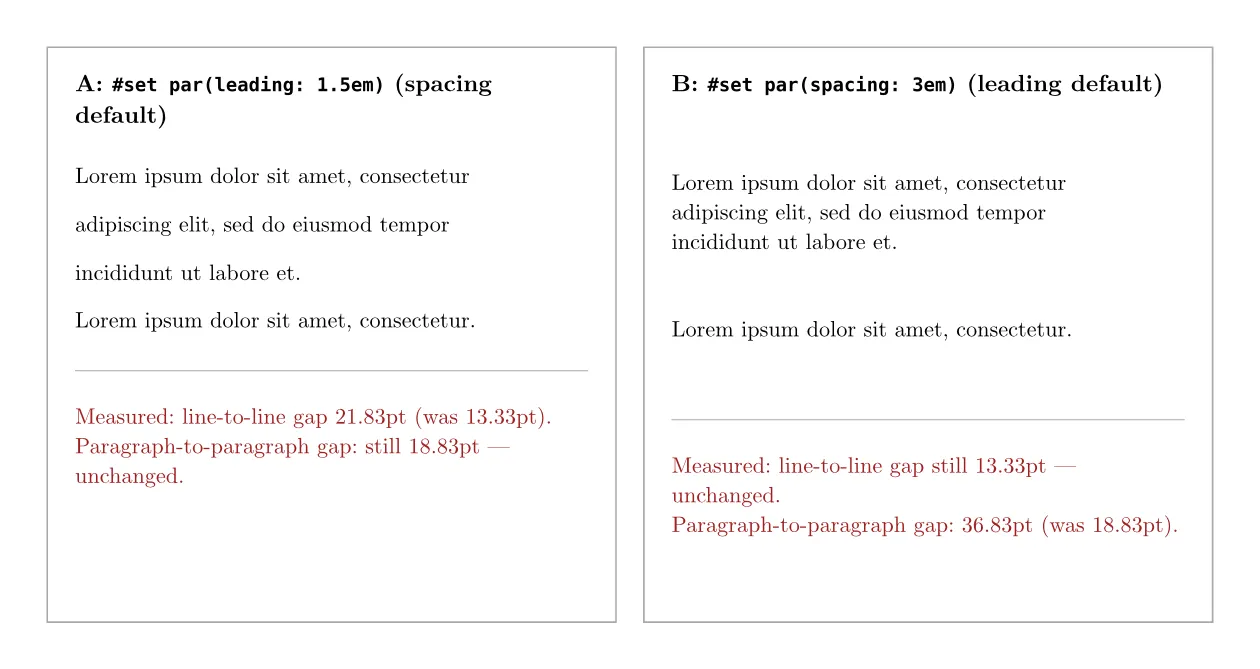
Raising leading on its own never moved the paragraph-to-paragraph gap
(18.83pt in both page 1 and page 2), and raising spacing on its own never moved
the line-to-line gap (13.33pt in both page 1 and page 3). They are independent by
design; the confusion is just the names.
Test 2: with one-line paragraphs, leading does literally nothing
This is a common cause of “I changed it and nothing happened”. leading only affects the gap between lines that exist because a
paragraph wrapped. If every paragraph is short enough to fit on one line, there’s
no such gap to change.
#set page(width: 18cm, height: 10cm, margin: 1.2cm)
#set text(size: 10pt, font: "New Computer Modern")

#set par(leading: 0.65em) // page 1; page 2 uses 4em instead
Short paragraph one, definitely one line.

Short paragraph two, definitely one line.

Short paragraph three, definitely one line.
Page 1 uses the default leading: 0.65em. Page 2 uses leading: 4em, more than
six times larger.
$ python3 measure_lines.py single_line_leading.pdf
--- page 1 (leading: 0.65em) ---
y0=32.79
y0=51.62  gap=18.83
y0=70.45  gap=18.83
--- page 2 (leading: 4em) ---
y0=32.79
y0=51.62  gap=18.83
y0=70.45  gap=18.83
The two gap columns are identical, down to the hundredth of a point.
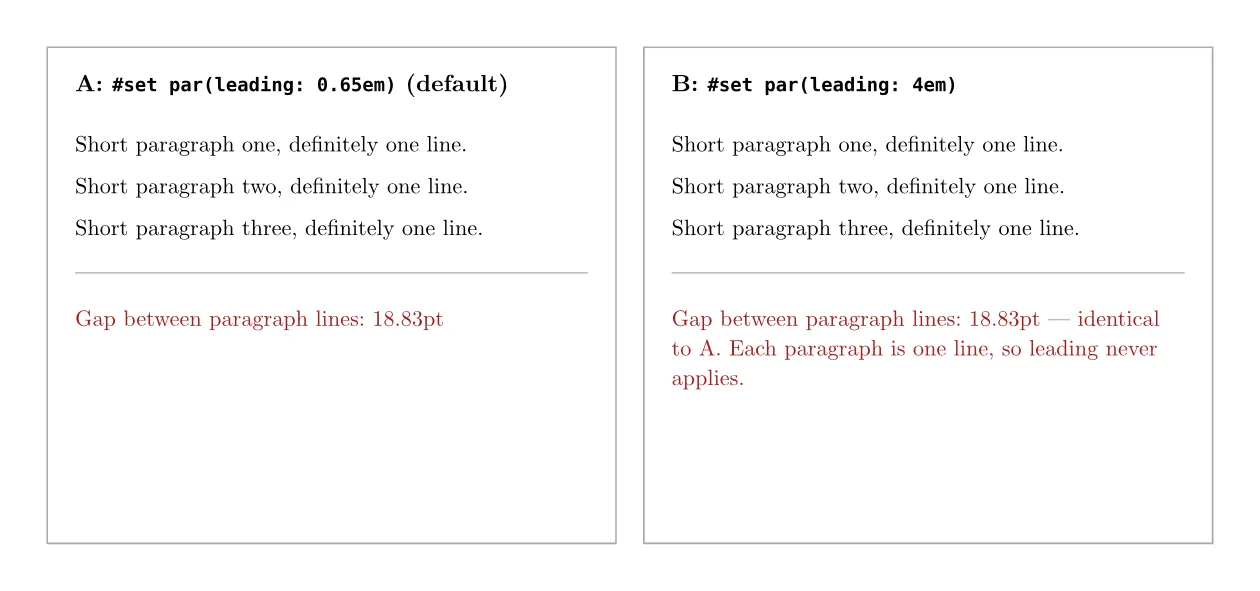
Multiplying leading by more than six did not move a single pixel in the output.
If your content is written in short paragraphs (which is normal for web copy),
leading is the wrong parameter for “more space between paragraphs” — that’s
spacing, covered in Test 1.
Test 3: par’s spacing doesn’t reach a tight list
The next place people reach for #set par(spacing: ...) is to loosen up a bullet
or numbered list. For an ordinary tight list, written as - item lines back to back,
it doesn’t work.
#set par(spacing: 3em)

- First item
- Second item
- Third item

Paragraph after the list.
$ python3 measure_lines.py list_spacing.pdf
--- page 1 (only par spacing set) ---
list item gap = 13.33pt (default, unchanged)
list-to-paragraph gap = 36.83pt (this one did change)The gap between list items stayed at the default 13.33pt. The gap from the list
down to the next paragraph did change to 36.83pt, because that transition is
governed by par. Adding #set list(spacing: 3em) on top fixes the item spacing:
#set par(spacing: 3em)
#set list(spacing: 3em)

- First item
- Second item
- Third item

Paragraph after the list.
list item gap = 36.83pt (now matches)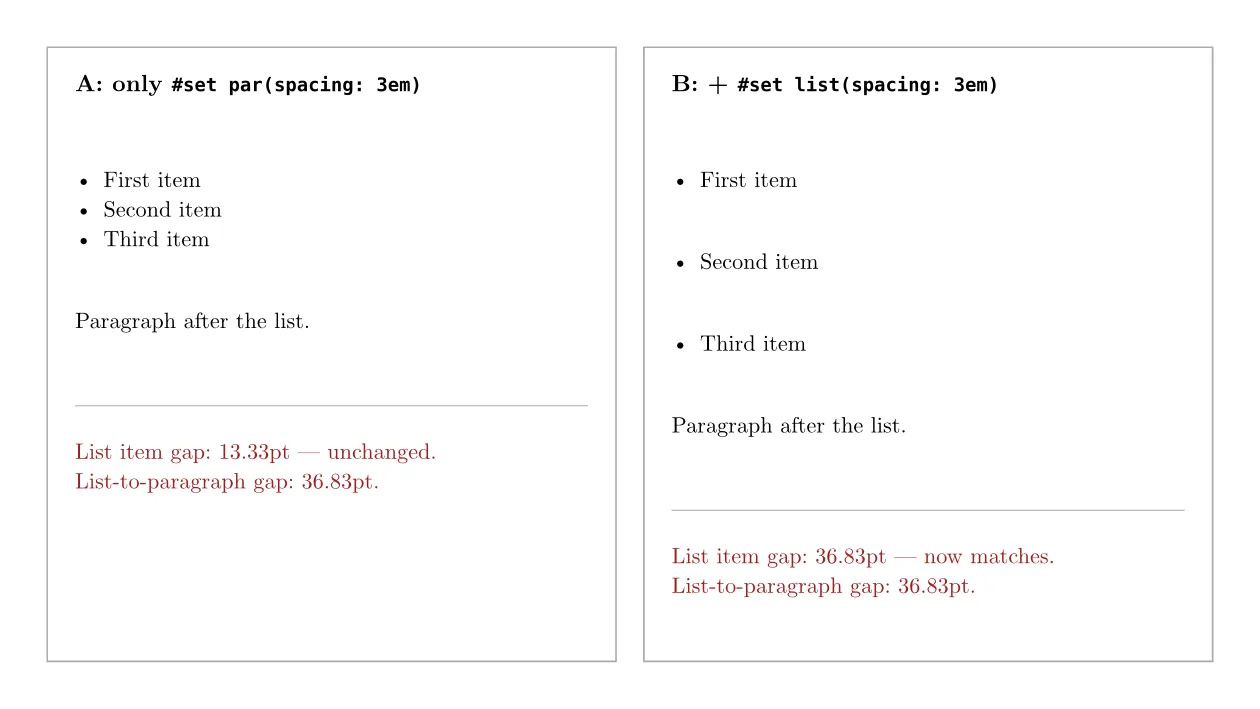
I checked why in a copy of Typst’s layout rules source (the file that implements
LIST_RULE and ENUM_RULE) that I saved on 2026-09-25. I didn’t record which
commit that copy came from, so treat the excerpt below as supporting evidence;
the measurements above are the proof. A tight list (no blank line between
items, the default when you write - item back to back) inserts its own spacing
before it renders, and if you never set list(spacing:), that value falls back to
par’s leading, not its spacing:
if tight {
    let spacing = elem
        .spacing
        .get(styles)
        .unwrap_or_else(|| styles.get(ParElem::leading));
    let v = VElem::new(spacing.into()).with_weak(true).with_attach(true).pack();
    realized = v + realized;
}
That explains the 13.33pt: it’s the same figure as the default paragraph
line-to-line gap from Test 1, not the default paragraph spacing. enum has the
identical fallback. If you want tight list items spaced like your paragraphs, set
list/enum’s own spacing explicitly, or make the list loose (next section).
Loose lists behave differently
Put a blank line between the items and Typst treats the list as “loose”. Then
par’s spacing does apply:
#set par(spacing: 4em)   // second copy: 1.2em

- one

- two

- three
par spacing | Item gap, tight list | Item gap, loose list |
|---|---|---|
| 1.2em (default) | 13.33pt | 18.83pt |
| 4em | 13.33pt (unchanged) | 46.83pt |
Numbered lists (+ one) gave the same numbers. If you also set list(spacing:),
it wins over par in a loose list too: par(spacing: 4em) plus
list(spacing: 1.2em) measured 18.83pt between items.
So a blank line between items is a second fix: the list then follows your paragraph spacing. The trade-off is that the list reads looser, each item spaced like a separate paragraph. The source excerpt above only covers the tight case; for loose lists this is a measured result, not something I found in the source.
Test 4: par’s spacing doesn’t reach the paragraph right after a heading
This is the least intuitive one, and the one I’d flag as “verify this yourself
before you rely on it.” I set the heading’s own block spacing via
#show heading: set block(above:, below:) (headings apply their default spacing through
BlockElem::above/below; a copy of Typst’s heading.rs I saved on 2026-09-25,
commit not recorded, computes below = Em::new(0.75) / scale for level 2+) and a par(spacing:) value on the paragraph that follows, using plain
pt units on both sides so there’s no ambiguity about what a relative em is
measured against:
#show heading: set block(above: 10pt, below: 5pt)   // case A
#set par(spacing: 50pt)
== Heading
Paragraph after the heading.
Four cases, only swapping which of below / spacing is large:
| Case | heading below | par spacing | Measured gap |
|---|---|---|---|
| A | 5pt | 50pt | 15.05pt |
| B | 50pt | 5pt | 60.05pt |
| C | 30pt | 30pt | 40.05pt |
| D | 5pt | 5pt | 15.05pt |
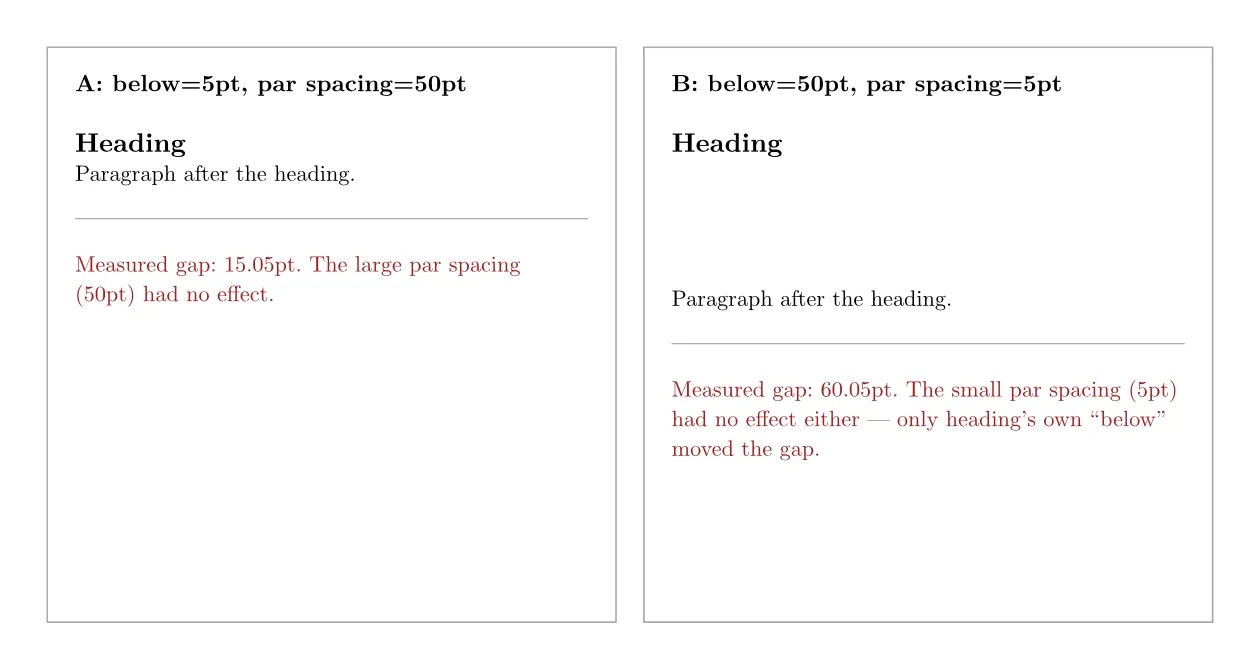
Case A and case D both use below: 5pt, and their spacing differs by 10x (50pt
vs 5pt) — the measured gap is identical (15.05pt) in both. Line up all four: the
gap is below + 10.05pt every time, regardless of what spacing was set to.
As a control, I ran the same two spacing values (50pt and 5pt) between two plain
paragraphs, no heading involved: the gaps came out to 56.83pt and 11.83pt — clearly
tracking spacing (roughly spacing + 6.83pt). So spacing is not broken in
general; it just doesn’t participate in this one specific transition, straight
after a heading.
Because “doesn’t work” claims are easy to get wrong, I also tried the variants a
reader is most likely to write, each with par(spacing:) at 0.5em and at 5em:
a level 1 heading with no show rule (17.55pt both times), a level 2 heading with
no show rule (15.94pt both times), and a level 3 heading under
#show heading: set block(below: 1em) (16.83pt both times). A pt value (5pt vs
50pt, level 2, no show rule) gave 15.94pt both times. Typst 0.14.2 matched in every case.
I want to be precise about what this result is and isn’t. It’s a black-box
measurement across four combinations on two Typst versions, and it was
consistent every time. It is not a documented rule — the local archive of Typst’s
reference docs (资料/typst_docs_20260925/) doesn’t include a page on block-level
spacing merging, so I could not find an official explanation for why the
paragraph’s own spacing is ignored here specifically. If you’re building something
where this gap matters precisely, reproduce Test 4 yourself before depending on
it; see “How to check this yourself” below.
What I’d do
- Reach for
leadingonly when you actually have wrapped, multi-line paragraphs. For short paragraphs, “no visible change” after raisingleadingisn’t a bug — there’s no wrapped line for it to act on. - Reach for
spacingfor the gap between paragraphs, but confirm it separately for anything that isn’t a plain paragraph next to another plain paragraph. It does not reach into tight lists (the usual back-to-back- itemlines), and — in my tests — it did not move the gap right after a heading either. - For lists, set
list(spacing:)/enum(spacing:)directly instead of assumingpar’s settings cascade down. A tight list’s unset default equalspar’sleading, which is usually much smaller than what people expect. Or leave a blank line between items, if a looser-looking list is fine. - For the space under a heading, use
#show heading: set block(below: ...)instead of trying to push it viapar.
How to check this yourself
The three numbers worth re-verifying, with the exact commands:
// single_line_leading.typ — confirms Test 2
#set page(width: 18cm, height: 10cm, margin: 1.2cm)
#set text(size: 10pt)
#set par(leading: 4em)
Short paragraph one, definitely one line.

Short paragraph two, definitely one line.
$ typst compile single_line_leading.typ single_line_leading.pdf
$ python3 measure_lines.py single_line_leading.pdfCompare the gap value against the same file with leading: 0.65em — they should
match.
// heading_gap.typ — confirms Test 4, case A vs case D
#show heading: set block(below: 5pt)
#set par(spacing: 50pt)   // then try 5pt in a second copy
== Heading
Paragraph after the heading.
Measure the gap both times; it should stay at roughly 15pt either way.
What this test does not cover
- Only the official macOS (Apple Silicon) CLI builds of Typst 0.15.1 and 0.14.2, tested 2026-09-29. I didn’t test the web app.
- Only
New Computer Modern, the Typst default font, at 10pt. Other fonts have different metrics, and the constant offsets I measured (like the “+10.05pt” in Test 4) will differ with font and size. I’d expect which parameter applies to stay the same, but I only measured this one font and size. - The internal mechanism behind Test 4 (why
par’s spacing is skipped right after a heading) is a measured, not a documented, result. I looked for it in the local Typst source and docs snapshot and didn’t find it; treat it as “reproduce before you rely on it,” not as a cited rule. - PDF output only. I didn’t test HTML export, which may lay out spacing differently.
- Grid, table, and figure captions were not covered here — the table caption article on this site handles table-specific spacing separately.