Typst Page Numbering: Title Page, Roman Numerals, Page X of Y
Turning on page numbers in Typst is one line: #set page(numbering: "1"). The
problems start with the second thing you ask for: a footer with your own text, a
title page that shouldn’t count, Roman numerals for the preface, “Page 3 of 10”, or
numbers at the top of the page. Each of those has a rule behind it that is written
down somewhere in the docs, usually as a single sentence, and each one produces a
page that looks wrong without any error or warning.
I compiled every snippet on this page with the two official Typst CLI builds listed in the tested box above, read the header and footer text back out of each PDF page with a small Python script, and checked that both versions print the same thing. They did, in every case. The screenshots are rendered from the same code on small 10 × 7 cm pages so the numbers are readable.
Short answer (tested 2026-09-30):
| You want | Do this | The trap |
|---|---|---|
| Your own footer text plus a page number | Put counter(page).display(...) inside footer: context [...] | Setting footer: switches numbering: off completely |
| No number on the title page, body starts at 1 | Title page with numbering: none, then #counter(page).update(1) at the top of the first body page | Without the update, the body starts at 2: the title page still counts |
| Roman numerals for the preface, then 1, 2, 3 | numbering: "i", then #set page(numbering: "1") + #counter(page).update(1) | A set page rule in the middle of the text starts a new page by itself |
| “Page X of Y” | numbering: "1 of 1" | Y is the counter’s final value, so the preface shows “i of iii” when it has 2 pages |
| Page numbers at the top | number-align: top + right | A reset with update(1) doesn’t reach the header on that page. Use update(0) before the break instead |
| Number on the outer edge (right on odd, left on even) | Custom footer that checks calc.odd(here().page()) | number-align can’t alternate on its own |
1. The page number disappears when you add a footer
This is the first one almost everybody hits:
// footer-override.typ
#set page(numbering: "1", footer: [My custom footer])
Page A
#pagebreak()
Page B
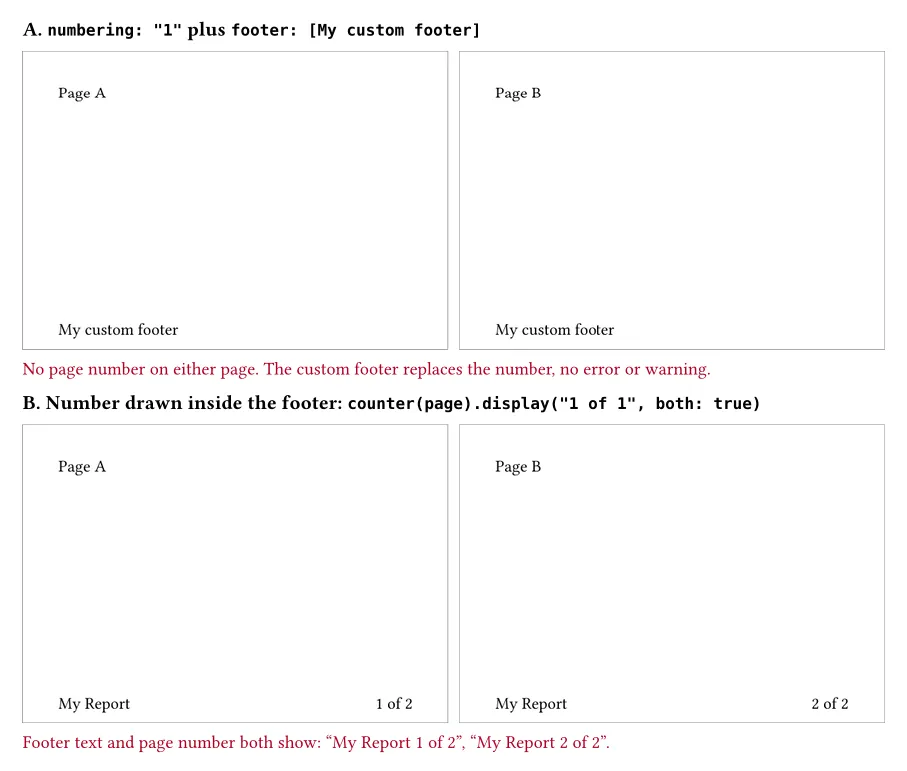
Both pages show “My custom footer” and no page number. Typst compiles
without complaint. The page reference says so in one sentence at the end of the
numbering parameter: “If an explicit footer (or header for top-aligned numbering)
is given, the numbering is ignored.” (typst.app/docs/reference/layout/page/, read
2026-09-30). The footer is where the number would have gone, so a custom footer
replaces it.
The fix is to draw the number yourself inside the footer. counter(page).display()
takes the same patterns as numbering, and both: true makes a pattern like
"1 of 1" fill in the total as well:
// footer-with-number.typ
#set page(footer: context [
  My Report #h(1fr) #counter(page).display("1 of 1", both: true)
])
Page A
#pagebreak()
Page B
This prints “My Report” on the left and “1 of 2”, “2 of 2” on the right. Note the
context before the footer’s content: without it you get a compile error (section 7).
2. No number on the title page, but the body starts at 2
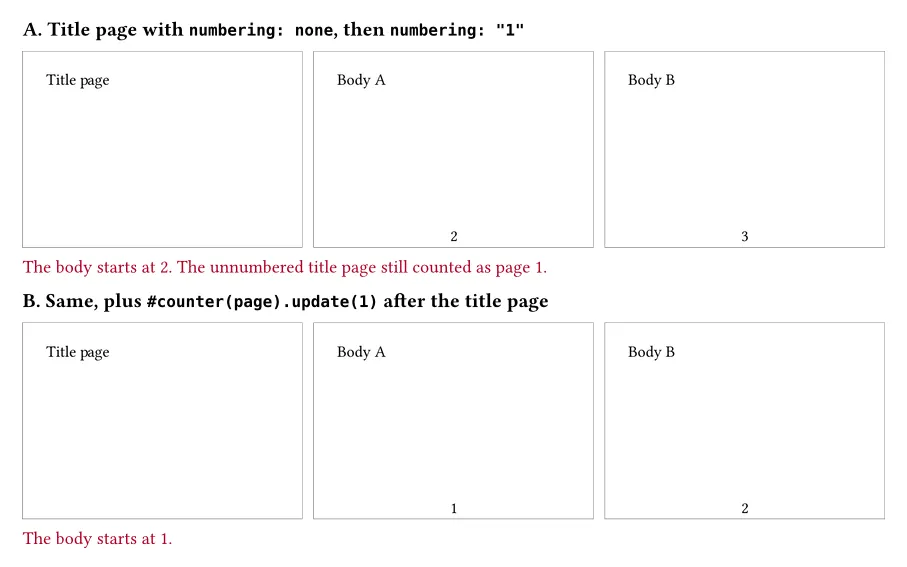
Turning numbering off for the title page only hides the number. The page is still counted:
// title-page-counts.typ
#set page(numbering: none)
Title page
#pagebreak()
#set page(numbering: "1")
Body A
#pagebreak()
Body B
The title page is blank at the bottom, and the two body pages are numbered 2 and 3. Typst’s page counter goes up at every page break, whether or not a number is shown. To start the body at 1, reset the counter at the top of the first body page:
// title-page-reset.typ
#set page(numbering: none)
Title page
#pagebreak()
#set page(numbering: "1")
#counter(page).update(1)
Body A
#pagebreak()
Body B
Now the body pages are 1 and 2. The same pattern works for any number of unnumbered pages in front: with a cover and a copyright page before the reset, the first body page was still 1.
3. Roman numerals for the preface, then 1, 2, 3
// roman-then-arabic.typ
#set page(numbering: "i")
Preface A
#pagebreak()
Preface B
#set page(numbering: "1")
#counter(page).update(1)
Chapter A
#pagebreak()
Chapter B
#pagebreak()
Chapter C
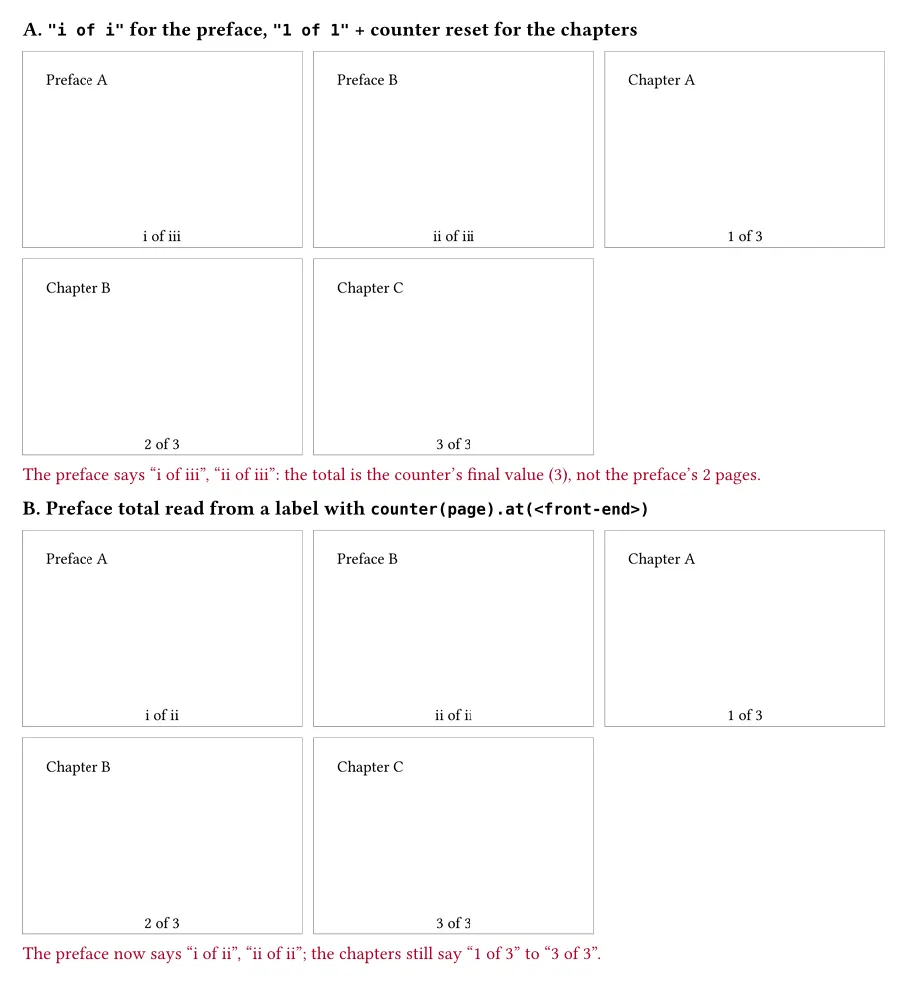
This prints i, ii, then 1, 2, 3. Notice there is no #pagebreak() before the second
set page. I didn’t forget it: a set page rule that changes page settings ends
the current page on its own. That is convenient here, but it also means you can’t
use set page(numbering: ...) to switch the style partway down a page. In a
separate test, a set page(numbering: "1") placed after the first line of a page
pushed the rest of the text onto a new page.
4. “Page X of Y”: why the preface says “i of iii”
The "1 of 1" pattern shows the current page and a total. The total is not the
number of pages in the PDF. It is the page counter’s final value. The page
reference says it directly: “These are logical numbers controlled by the page
counter, and may thus not match the physical numbers. Specifically, they are the
current and the final value of counter(page).”
Combine that with a counter reset and the preface gets a total that belongs to the chapters:
// x-of-y-preface.typ
#set page(numbering: "i of i")
Preface A
#pagebreak()
Preface B
#set page(numbering: "1 of 1")
#counter(page).update(1)
Chapter A
#pagebreak()
Chapter B
#pagebreak()
Chapter C
The chapters are fine (“1 of 3” to “3 of 3”), but the two preface pages say
“i of iii” and “ii of iii”: the counter ends at 3, so every “of” says 3,
written in the preface’s numerals. The simplest fix is to leave the total off the
preface (numbering: "i"). If you want the total there too, put a label at the end of
the preface and read the counter at that point:
// x-of-y-preface-fixed.typ
#set page(numbering: "i", footer: context align(center,
  counter(page).display() + " of " + numbering("i", ..counter(page).at(<front-end>))
))
Preface A
#pagebreak()
Preface B
#metadata(none) <front-end>
#set page(numbering: "1 of 1", footer: auto)
#counter(page).update(1)
Chapter A
#pagebreak()
Chapter B
#pagebreak()
Chapter C
This gives “i of ii”, “ii of ii”, then “1 of 3” to “3 of 3”. footer: auto hands the
footer back to numbering for the chapters.
If you need the real number of sheets, including unnumbered ones, count physical pages with a label on the last page instead of reading the counter:
// physical-total.typ
#set page(footer: context align(center)[
  Sheet #here().page() of #locate(<last>).page()
])
Cover
#pagebreak()
#counter(page).update(1)
Body A
#pagebreak()
Body B
#metadata(none) <last>
This prints “Sheet 1 of 3”, “Sheet 2 of 3”, “Sheet 3 of 3”, ignoring the reset. In
the same file, counter(page).final() returned 2.
5. Page numbers at the top ignore the reset on that page
Moving the numbers to the header with number-align: top breaks the reset from
sections 2 and 3:
// top-numbers-reset.typ
#set page(numbering: "i", number-align: top + right)
Preface A
#pagebreak()
Preface B
#set page(numbering: "1")
#counter(page).update(1)
Chapter A
#pagebreak()
Chapter B
The header reads i, ii, 3, 2. The first chapter page shows 3, and the page after
it shows 2. With "1 of 1" at the top and a title page, I got “1 of 2”, “2 of 2”,
“2 of 2”.
This has been reported on the Typst issue tracker more than once (#2828, #3835), and both reports were closed without a code change. In #3835 (closed 2024-08-22), a Typst maintainer explains: “The page counter is updated in the main content of the page, which is after the page’s header, so the result is not reflected there.” That matches what I measured. When I printed the raw counter value in both places on the reset page, the header said 2 and the footer said 1. Bottom numbers see the reset and top numbers don’t.
The fix given in both issues is to set the counter to 0 before the page break, so the automatic +1 at the break lands on 1:
// top-numbers-fixed.typ
#set page(numbering: "i", number-align: top + right)
Preface A
#pagebreak()
Preface B
#counter(page).update(0)
#set page(numbering: "1")
Chapter A
#pagebreak()
Chapter B
Header: i, ii, 1, 2. Correct.
Don’t copy this fix into a document with numbers at the bottom. The footer of the
last preface page is laid out after the update(0), so it shows zero, and in Roman
numerals zero is written “n”:
// bottom-numbers-update0.typ
#set page(numbering: "i")
Preface A
#pagebreak()
Preface B
#counter(page).update(0)
#set page(numbering: "1")
Chapter A
#pagebreak()
Chapter B
Footer: i, n, 1, 2. So the rule is: numbers at the bottom, update(1) after the
break. Numbers at the top, update(0) before it. If the last page before the break has
no number at all (a title page with numbering: none), update(0) before the break
works for both.
A side effect worth knowing: the page-setup guide’s example for hiding the header on
the title page, if counter(page).get().first() > 1, keeps working after a reset
to 1. The header on the first body page still reads the old value (2), so the
header does appear there.
6. Where the update goes on the page
The page-setup guide says counter(page).update(1) “should be placed at the start
of a page because it will otherwise create a page break.” In my tests it did not
create a page break. Instead the new value applied to the whole page, including the
text above the update:
// update-mid-page.typ
#set page(numbering: "1")
Page A
#pagebreak()
Top of second page.

#counter(page).update(5)

Bottom of second page.
#pagebreak()
Third page
Three pages, numbered 1, 5, 6, with both paragraphs of the second page on the
same page. I got the same result with the update inside a paragraph, with
update(n => n + 10), and with the update on the first page. I’d still follow the
guide and put the update at the top of the page. The result is the same, and the
code shows what you meant.
7. “can only be used when context is known”
Reading the counter in a header or footer without context fails:
// no-context.typ
#set page(footer: [Page #counter(page).display()])
Page A
error: can only be used when context is knownThe compiler adds two hints: “try wrapping this in a context expression” and “the
context expression should wrap everything that depends on this function”. Add
context in front of the footer’s content, as in section 1. counter(page).get()
fails with the same error. You don’t need context to update the counter, only to
read it.
8. Numbers on the outer edge: right on odd pages, left on even pages
number-align takes one alignment for every page. The page-setup guide notes that
alternating between even and odd pages “is not currently supported using this
property”. A custom footer can do it:
// odd-even.typ
#set page(footer: context {
  let n = counter(page).display("1")
  if calc.odd(here().page()) { align(right, n) } else { align(left, n) }
})
Page A
#pagebreak()
Page B
#pagebreak()
Page C
Pages 1 and 3 have the number on the right, page 2 on the left. I used
here().page(), the physical page, so the sides follow the physical sheets even after a counter reset (tested with a cover page and a reset: right, left, right, left).
If your book starts on a left-hand page, swap the two branches.
9. The table of contents uses each page’s own style
If you’re worried that the outline will list preface headings as 1, 2 after you switch styles, it doesn’t:
// outline-styles.typ
#set page(numbering: "i")
#outline()
= Preface
#pagebreak()
#set page(numbering: "1")
#counter(page).update(1)
= Chapter One
#pagebreak()
= Chapter Two
The outline lists “Preface … i”, “Chapter One … 1”, “Chapter Two … 2”.
What I’d do
For a typical report or thesis: title page with numbering: none, preface in "i"
with no total, #counter(page).update(1) right after the set page that switches to
"1" or "1 of 1", and numbers at the bottom. That is the setup where every
default does what it looks like it does. If the design needs numbers at the top,
switch the reset to update(0) before the break (section 5) and check the first
page of each section in the PDF. That’s the page that goes wrong.
How to check this yourself
Compile any snippet above and look at the first page after each reset. That’s where
every problem on this page shows up. If you’d rather not scroll through a PDF, this
prints the text in the top and bottom margins of every page. It uses PyMuPDF
(pip install pymupdf):
# margins.py - usage: python3 margins.py file.pdf
import sys, pymupdf
for i, page in enumerate(pymupdf.open(sys.argv[1]), 1):
    h = page.rect.height
    top = [b[4].strip() for b in page.get_text("blocks") if b[3] < 60]
    bottom = [b[4].strip() for b in page.get_text("blocks") if b[1] > h - 60]
    print(f"page {i}: top={top} bottom={bottom}")
$ typst compile top-numbers-reset.typ
$ python3 margins.py top-numbers-reset.pdfOn top-numbers-reset.typ it should print 3 at the top of page 3.
What this test does not cover
- Only the official macOS (Apple Silicon) CLI builds in the tested box, tested 2026-09-30. I didn’t test the web app.
- PDF output only. I didn’t test HTML export.
- For
number-alignI testedtop + right,bottom(center, the default) andbottom + right. I didn’t test documents that switch between top and bottom numbering partway through. - The claim in section 6 (no page break from a mid-page update) held in the four layouts I tried. It contradicts one sentence in the official guide, so if your layout is more complex, check the page count after adding an update.
- The “working as intended” explanation in section 5 comes from comments by Typst team members on GitHub issues #2828 and #3835 (read 2026-09-30), not from the reference docs.