Typst Heading Numbering: Per-Level Formats and the none Trap
If you search for how to give different heading levels different numbering in Typst,
you usually find this answer: pass a function to numbering and return none for
the levels you don’t want numbered. It compiles, and at a glance it looks right.
I compiled every variant below with the official Typst CLI, 0.15.1 (current
release, 2026-07-17) and 0.14.2, and measured where the text lands in the PDF.
Both versions behaved the same in every case. The none trick has two side effects
that no error message tells you about.
Short answer (Typst 0.15.1 and 0.14.2, tested 2026-09-25):
| You want | Use | Watch out for |
|---|---|---|
| Stop numbering below level 2 | #show heading.where(level: 3): set heading(numbering: none) | Returning none from the numbering function instead leaves a 0.3em gap before the heading text and lets @references compile to “Section .” |
Limit the depth with a pattern like "1.1" | Doesn’t work that way | "1.1" gives level 3 headings 1.1.1. The last counting symbol repeats |
| Different formats per level (“TOP 1:” then “1.1”) | A numbering function that checks nums.pos().len() | Whatever the function returns also appears in references and the outline, including a trailing colon |
| Only the last number with a per-level symbol (I. / A. / 1.) | numbering(("I.", "A.", "1.").at(n.len() - 1), n.last()) | The pattern "I.A.1." gives the full chain I.A.1. instead |
| Appendices restarting at A | #counter(heading).update(0) then #set heading(numbering: "A.1", supplement: [Appendix]) | Nothing, this worked as expected |
Test 1: returning none leaves a gap
The widely shared version looks like this:
#set heading(numbering: (..n) => if n.pos().len() <= 2 { numbering("1.1", ..n) })
= Intro
== Scope
=== Detail
Level 3 “Detail” has no number, as intended. But it is shifted to the right. I drew a red line on the left margin to make the difference visible:
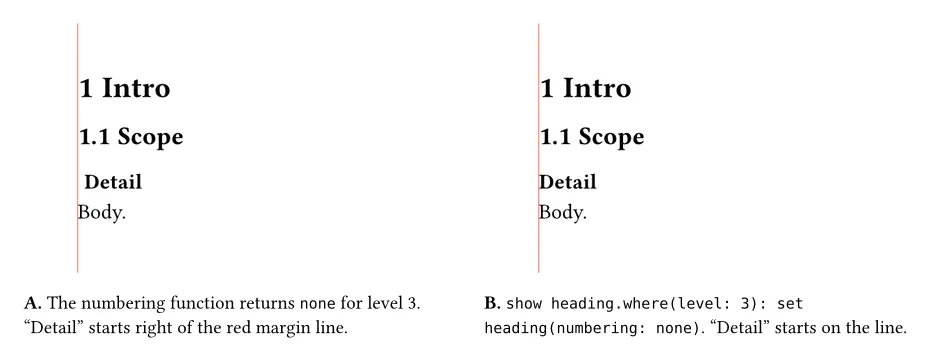
Measured from the PDF (text x position, in points, with an 11pt body and a 1cm page margin). The absolute numbers depend on your margin; compare the difference, not the values:
| Variant | “Detail” starts at | Body text starts at |
|---|---|---|
| No numbering at all | 28.35 | 28.35 |
Function returns none for level 3 | 31.65 | 28.35 |
Function returns "" for level 3 | 31.65 | 28.35 |
show heading.where(level: 3): set heading(numbering: none) | 28.35 | 28.35 |
The gap is 3.30pt, which is exactly 0.3em at 11pt. The reason is in the source
(crates/typst-layout/src/rules.rs, tag v0.15.1): if a heading’s numbering is set
to anything, Typst renders the numbering, adds SPACING_TO_NUMBERING
(Em::new(0.3)), then the body. It doesn’t check whether your function returned
anything. An empty string behaves the same way.
The show-set rule sets numbering itself to none for that level, so Typst skips
the numbering and the spacing.
Test 2: references to those headings go quiet
This is the one that can reach a finished PDF. With the same function, I added a label and referenced it:
=== Detail <det>
See @det.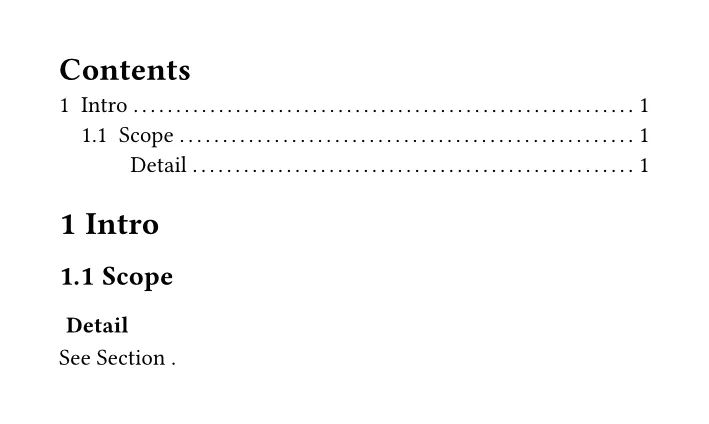
It compiled without an error or a warning and printed “See Section .”. Typst
considers the heading numbered, because numbering is set, so the reference is
allowed and shows whatever the function returned for it: nothing.
With the show-set rule, the same reference fails the build:
error: cannot reference heading without numbering
  = hint: you can enable heading numbering with `#set heading(numbering: "1.")`
A build error is the better outcome here. You find the broken reference now, not after the PDF is sent.
Test 3: “1.1” doesn’t limit the depth
A common assumption is that numbering: "1.1" means “number two levels”. It
doesn’t. My level 3 heading came out as 1.1.1 Detail. The
numbering docs (read
2026-09-25) explain it: “If numbering is a pattern and more numbers than counting
symbols are given, the last counting symbol with its prefix is repeated.” To stop
at a depth, use the show-set rule from Test 1.
Test 4: different formats per level
A forum question asks for level 1 as “TOP 1: First Name” and level 2 as “1.1 first subsection”. The direct answer:
#set heading(numbering: (..n) => {
  let n = n.pos()
  if n.len() == 1 { "TOP " + str(n.first()) + ":" } else { numbering("1.1", ..n) }
})
The headings look right. The outline and references don’t:
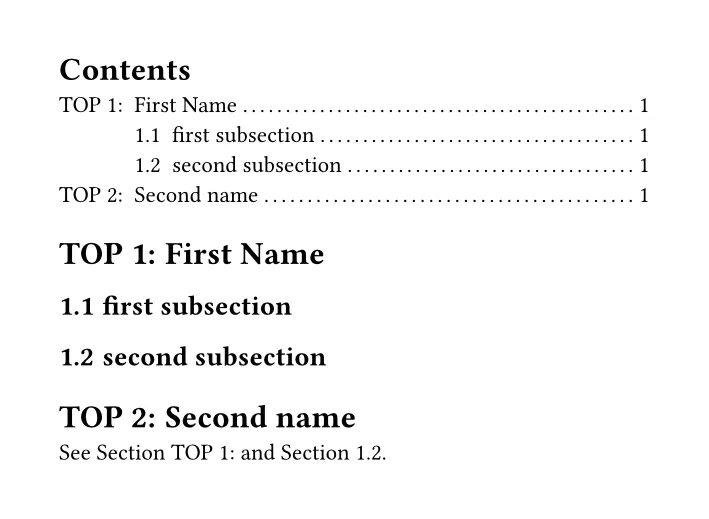
“See Section TOP 1: and Section 1.2.” The colon and the word “TOP” are part of the number, so every reference gets them, plus the default “Section” supplement.
What I ended up with: keep the number itself clean, turn off the supplement for level 1, and add the colon only where the heading is drawn.
#set heading(numbering: (..n) => {
  let n = n.pos()
  if n.len() == 1 { "TOP " + str(n.first()) } else { numbering("1.1", ..n) }
})
#show heading.where(level: 1): set heading(supplement: none)
#show heading.where(level: 1): it => if it.numbering == none { it } else {
  block(counter(heading).display(it.numbering) + [: ] + it.body)
}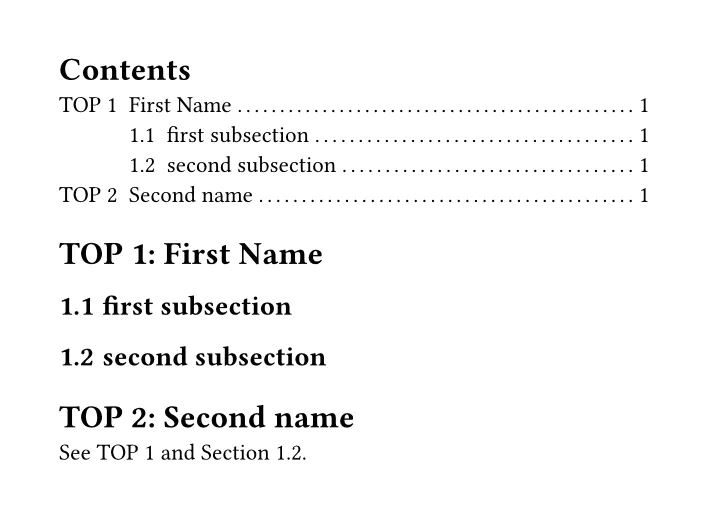
Now the reference reads “See TOP 1 and Section 1.2.”, and the outline has no stray colons.
The if it.numbering == none { it } guard is needed. My first version didn’t
have it and failed on both versions with
error: expected string, function, or auto, found none. The outline’s own
“Contents” title is a level 1 heading with no numbering, and the show rule applies
to it too.
Test 5: only the last number (I. / A. / 1.)
For an outline-style “I. / A. / 1.” where each level shows only its own number, the
pattern "I.A.1." isn’t enough. It gave I., I.A., I.A.1.. Choosing the symbol by
depth and passing only the last number works:
#set heading(numbering: (..n) => {
  let n = n.pos()
  numbering(("I.", "A.", "1.").at(n.len() - 1), n.last())
})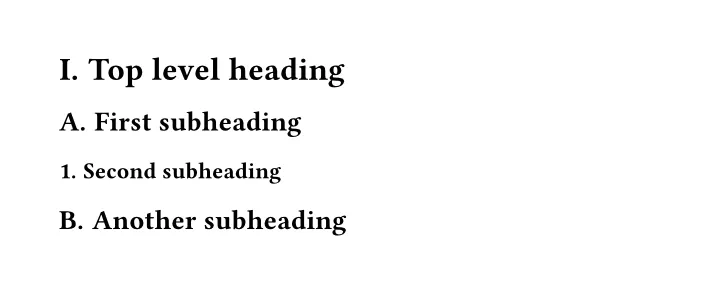
The counter still counts the full hierarchy, so the second level 2 heading correctly
becomes “B.”. If you nest deeper than three levels, .at() fails with an index error,
so add a fourth symbol or a fallback.
Test 6: appendices
#set heading(numbering: "1.1")
= Intro
= Method
== Setup <setup>
#counter(heading).update(0)
#set heading(numbering: "A.1", supplement: [Appendix])
= Raw data <raw>
== Tables
See @setup and @raw.
Output: 1 Intro, 2 Method, 2.1 Setup, A Raw data, A.1 Tables, and “See
Section 2.1 and Appendix A.” The references before the switch keep “Section”, and
the ones after get “Appendix”. No surprises.
What I’d do
- Don’t return
noneor""from a numbering function to hide numbers. Use a show-set rule per level. You avoid the gap, and a reference to an unnumbered heading fails the build instead of printing “Section .”. - Keep decoration out of the numbering. Anything the function returns ends up in
references and the outline. Put colons and words like “Chapter” in a show rule or
the
supplement. - Guard custom heading show rules with
it.numbering == none, or your outline title can break the build.
What this test does not cover
- Only the official macOS (Apple Silicon) CLI builds of Typst 0.15.1 and 0.14.2, tested 2026-09-25. I didn’t test the web app.
- Default page and font settings, left-aligned headings. Centered headings and a
custom
hanging-indentweren’t tested. - PDF output only. HTML export handles headings differently (see the heading docs).