Syncthing v1 to v2 Upgrade: What Changes on Disk
The switch to SQLite runs by itself the first time v2 starts, and v2 keeps your old database and config. Going back to v1 fails by default, but a v2 device and a v1 device can still connect.
Syncthing 2.0 swapped its database from LevelDB to SQLite. The v2.0.0 release notes cover that and a handful of other changes, but they don’t show what an upgrade actually looks like on disk, or what happens if you change your mind.
So I upgraded a real v1 setup and watched. Two instances on one Mac shared a folder of 3,005 files. I upgraded one of them to v2 while the other stayed on v1, then tried to go back.
Short answers (tested 2026-09-24, v1.30.0 → v2.1.5, macOS):
- The migration runs by itself the first time v2 starts. On my index of 3,037 entries (files plus folders) it took under a second and logged every step.
- v2 keeps your old database and config. It renames the old database folder and saves a copy of the old config. Nothing is deleted.
- Going back to v1 fails by default. v1 refuses to start because the config is newer. You can force it, but v1 then builds a fresh database from scratch.
- A v2 device and a v1 device can still connect. A file created on v1 synced to v2 over a single connection. Two v2 devices use three.
What the upgrade did on disk
I stopped the v1.30.0 instance and started v2.1.5 on the same config directory
(--home). These lines are from its log, in order:
INF syncthing v2.1.5 "Hafnium Hornet" (go1.27.1 darwin-arm64)
INF Archiving a copy of old config file format (path=…/config.xml.v37)
INF Migrating old-style database to SQLite; this may take a while...
INF Migrated folder (folder=test-shared files=3037 blocks=2941 duration=0s …)
INF Migrating virtual mtimes...
INF Migration complete (files=3037 blocks=2 duration=0s)
The v2 API was answering half a second after launch. The release notes warn that the migration “can be lengthy for larger setups”. My folder was small, so treat “under a second” as a floor, not a promise.
Here’s what changed in the config directory after that first v2.1.5 start:
- Old database:
index-v0.14.0.db/(3.1 MB) was renamed toindex-v0.14.0.db-migrated/. Same size, untouched. - New database:
index-v2/(2.9 MB), the SQLite one. config.xml: went fromversion="37"toversion="52".- Old config: saved next to it as
config.xml.v37.
Device ID, folder list and remote devices all came through unchanged. When I started it a second time, it didn’t migrate again.
The -migrated folder is dead weight once you’re happy on v2. I found nothing in
the docs saying you can delete it; I left it alone.
Going back to v1: refused, then a rebuild
To test a rollback, I copied the upgraded config directory and pointed v1.30.0 at the copy. It wouldn’t start:
WARNING: Failed to initialize config: config file version (52) is newer than
supported version (37). If this is expected, use --allow-newer-config to override.
[monitor] INFO: Syncthing exited: exit status 1
v1’s monitor process tried four times in about four seconds, then gave up
with 4 restarts in 4.120022916s; not retrying further. If you downgrade a
package and Syncthing “just doesn’t come up”, this is the line to look for.
With --allow-newer-config, v1 did start, but look at what it did:
INFO: Archiving a copy of old config file format at: …/config.xml.v52
INFO: Running database migration 14...
INFO: Running database migration 16...
…
INFO: Running database migration 20...
INFO: No stored folder metadata for "test-shared"; recalculating
INFO: Completed initial scan of sendreceive folder "shared" (test-shared)- It didn’t reuse
index-v0.14.0.db-migrated. That folder’s timestamp didn’t change. v1 created a newindex-v0.14.0.dbnext to it and filled it by rescanning the folder. My files were fine, but on a big folder that means a full rescan. - It rewrote
config.xmlin v1’s own format, but the file still saysversion="52". Settings that only exist in v2 (blockIndexing,pullerDelayS,sessionCookieDurationS,sessionCookiePath) were dropped. Old v1 settings likeweakHashThresholdPctcame back. The untouched v2 config was saved asconfig.xml.v52.
So a rollback works, but it isn’t a clean undo. If you think you might go back, copy your whole config directory before the first v2 start. The copy gives you the real v1 database, not a rebuilt one.
Mixed v1 and v2 devices
While one instance ran v2.1.5 and the other stayed on v1.30.0, I created a file on
the v1 side (dir04/v1new.md). It arrived on v2, and the v2 log recorded it as
Synced file … file.name=dir04/v1new.md. I didn’t log the other direction
(v2 to v1), so I can’t confirm it here.
The two devices were linked by one connection. When I stopped v2, its log said
Lost device connection (kind=primary … remaining=0), which means nothing else was
open.
After I upgraded the second instance too, the picture changed. The release notes
say v2 devices now use “three connections: one for index metadata and two for data
exchange”. My log showed a primary connection, then a second one 5 seconds later
and a third 5 seconds after that. lsof counted 3 established TCP connections
between the two. The web GUI shows it as Number of Connections: 1 + 2:
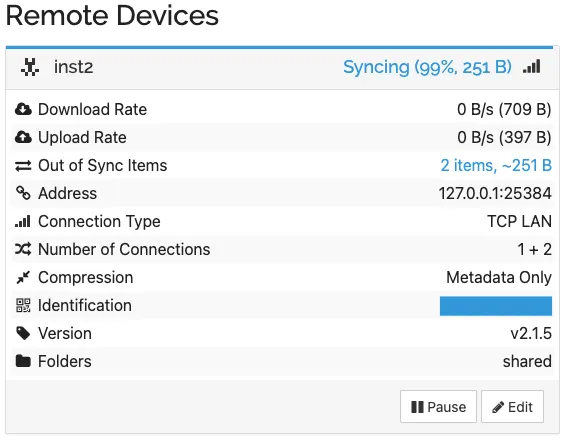
If you watch connections with a firewall or lsof, expect three per v2 peer.
Nothing is wrong. The “Syncing 99%” in that panel is unrelated: it comes from two
earlier tests, an ignored delete and a local edit, covered in
our Revert Local Changes article.
Other v2 changes worth knowing before you upgrade
I didn’t test these. They’re quoted from the v2.0.0 release notes:
- Deletes are forgotten after six months. “Deleted items are no longer kept
forever in the database, instead they are forgotten after six months.” If a device
can stay offline longer than that and still needs to receive the delete, the notes
say to set
--db-delete-retention-intervalto zero or a longer interval. - No more default folder. “A ‘default folder’ is no longer created on first startup.”
- Command-line options changed. “Old single-dash long options are no longer
supported, e.g.
-homemust be given as--home.” Check any scripts or service files that start Syncthing. - Log format changed to structured key-value lines (you can see it in the logs
above), and
--verboseand--logflagswere removed. - Deletes can now win a conflict. In that case the deleted file is moved to a conflict copy.
- Some platforms lost prebuilt binaries in v2.0.0, including NetBSD and
32-bit Windows on ARM (
windows/arm). See the notes for the full list. NetBSD on amd64 is back in later 2.x releases (netbsd-amd64is in the v2.1.5 checksum file). 64-bit Windows on ARM was never on that list; v2.1.5 has awindows-arm64build.
What I’d do
- Stop Syncthing and copy the whole config directory (the one with
config.xml,cert.pem,key.pemand the database). That copy is your real way back to v1. - Search your startup scripts for single-dash options like
-homeand change them to--home. - Start v2 and check the log for
Migration complete. - You can probably upgrade one device at a time. In my test the v1 and v2 devices connected and a v1 file reached v2; I didn’t check the v2-to-v1 direction.
What this test does not cover
- One Mac, two instances, a 3,005-file folder. I didn’t measure migration time on a large index.
- Only v1.30.0 → v2.1.5 on macOS with the official darwin-arm64 builds. Package managers and Docker images may start Syncthing with other options.
- Mixed versions: I only logged a file going from v1 to v2, not the reverse.
- I didn’t test the six-month delete retention or conflict handling for deletes. The notes above are quoted from the release notes, not from my test.