Syncthing "Revert Local Changes": What It Deletes
On a Receive Only folder, Revert Local Changes deletes the files you added. With versioning off they are not in .stversions or the macOS Trash; with Simple File Versioning on, they are kept in .stversions.
A Receive Only folder is Syncthing’s way of saying “this copy is a mirror; don’t push anything from here”. The trouble starts when you do change something in that mirror. Syncthing flags it, a red Revert Local Changes button appears, and the obvious reading of that button is “undo my edits”. For files you added, the button actually deletes them.
That part is documented. What isn’t spelled out anywhere is exactly what “deleted” means on your disk, or how that depends on file versioning. So I tested it on two Syncthing instances, one Receive Only, and checked the disk after each click.
Short answer (Syncthing v2.1.5, tested 2026-09-24, conflict-copy row added 2026-10-10):
| What you did on the Receive Only side | After Revert Local Changes, versioning off | After Revert Local Changes, Simple File Versioning on |
|---|---|---|
| Added a new file | Deleted. Not in .stversions, not in the macOS Trash | Removed from the folder, kept in .stversions |
| Edited a file that came from the cluster | Replaced with the cluster version (see note below) | Replaced with the cluster version; your edited copy kept in .stversions |
Kept a file the other side deleted (because ignoreDelete is on) | — | Left alone. Revert did not touch it |
Ended up with a .sync-conflict-… copy of your edit | Deleted. Not in the macOS Trash | Removed from the folder, kept in .stversions |
If you have local work in a Receive Only folder and versioning is off, copy it somewhere else before you press the button.
What the official docs say
The folder types page (written for v2.1.0, read 2026-09-24) says it plainly:
Activating this will cause the local modifications to be undone - added files will be deleted, modified or deleted files will be re-synced from the cluster.
The same page covers conflict copies (read 2026-10-10):
Being a receive-only folder, the sync conflict copy will not be sent to the cluster - and will be deleted if “Revert Local Changes” is used.
So deleting added files is the designed behaviour, not a bug. What the docs don’t say is whether anything catches those files. The versioning page arguably points the other way. It says versioning “applies to changes received from other devices” and that when you change a file locally, “Syncthing will not and can not archive the old version”. A reasonable reader would conclude versioning won’t save files that a local button removes. In my test it did.
The setup
- Two Syncthing v2.1.5 instances on one Mac, called
inst1andinst2. Both listen on 127.0.0.1 only, with global discovery, local discovery, relays and NAT traversal turned off. The binaries are the official darwin-arm64 builds; their SHA-256 hashes matched the ones published with each release. - One shared folder with 3,005 test files: 3,000 small Markdown files in 30 subfolders, plus five 1 MiB binary files.
inst1: Send & Receive.inst2: Receive Only, withignoreDeleteturned on. I used ignoreDelete for a separate test; it matters for one row of the table above.
Every change below was followed by a manual rescan, so the results don’t depend on the file watcher’s timing.
Test 1: Revert with Simple File Versioning on
On inst2 (the Receive Only side), with Simple File Versioning set to keep 5 versions:
- Appended a line to an existing synced file,
dir06/note006.md. - Created a new file,
dir06/local_only.md. - Rescanned. The folder showed Local Additions and Locally Changed Items: 2 items.
The Send & Receive side never received
local_only.md, which is what Receive Only is supposed to do. - Clicked Revert Local Changes. For the test I sent the same request through the
REST API,
POST /rest/db/revert?folder=….
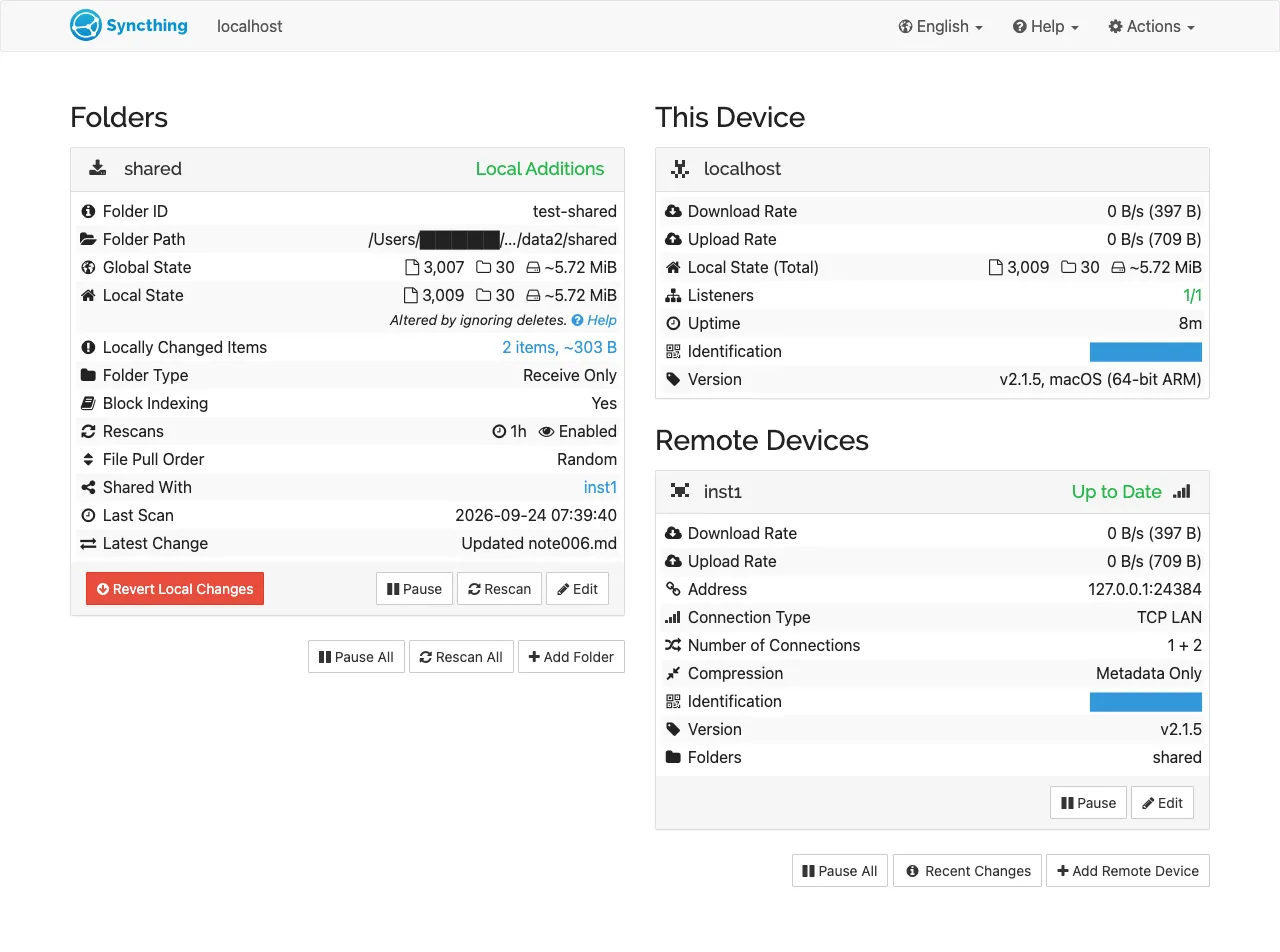
This is what the panel looks like with local changes pending (screenshot from later in the same session, after a separate local edit for illustration):
Ten seconds after the revert:
local_only.md            → gone from dir06/
note006.md               → my appended line gone (cluster version restored)
.stversions/dir06/local_only~20260924-073054.md   ← my added file
.stversions/dir06/note006~20260924-073055.md      ← my edited copy
Both of my changes survived, but only in .stversions, under the usual
name~YYYYMMDD-HHMMSS.ext naming.
Test 2: the same thing with versioning off
Next I turned versioning off on inst2 (versioning type set to none), then:
- Created
dir07/precious.mdon the Receive Only side. - Rescanned, then clicked Revert Local Changes.
Result, checked about ten seconds later:
precious.md in the folder:        no
precious* anywhere in .stversions: 0 files
precious* in ~/.Trash:             0 files
The file was gone for good, and nothing on the Mac kept a copy. Syncthing deletes it directly; it doesn’t go through the macOS Trash.
In test 2 I only checked an added file. With versioning off, I didn’t separately test what happens to a local edit of a synced file. The docs say it is “re-synced from the cluster”, which means your edit is overwritten.
The ignoreDelete detail
Earlier in the session I deleted dir05/note005.md on the Send & Receive side.
Because inst2 had ignoreDelete on, the file stayed on inst2, and the GUI said
“Altered by ignoring deletes”. You can see that line in the screenshot above.
Revert Local Changes did not remove it. The file was still there after both
reverts. So on this version, files that exist only because deletes were ignored don’t
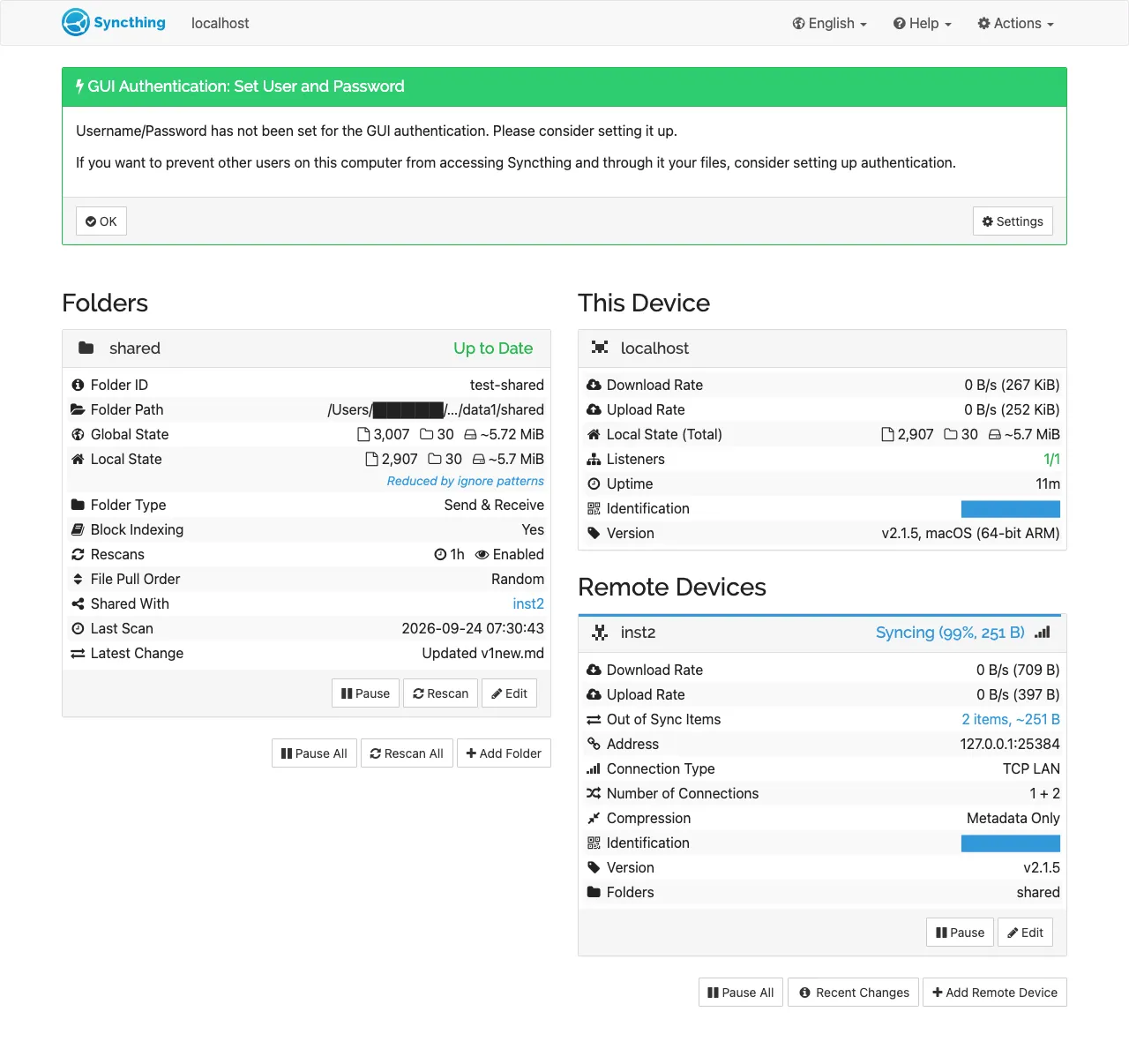
count as “local changes”. The Send & Receive side, meanwhile, keeps showing inst2 as
Syncing (99%) with 2 out-of-sync items. I checked which two through the REST API
(/rest/db/remoteneed): the ignored delete of dir05/note005.md, and a local edit to
dir08/note008.md that I had made on the Receive Only side for the screenshot.
Neither goes away on its own.
That matches the ignoreDelete page, which warns that the setting leaves each side thinking the other is out of date, and that it “should normally be set to false”.
Follow-up tests (2026-10-10)
Same v2.1.5 build, same Mac, a fresh folder with ignoreDelete off, and the
watcher off so every step was a manual rescan. Revert went through the same REST call
as before.
Conflict copies. I paused the connection, edited a file on both sides (the
Receive Only side first), and reconnected. The cluster’s edit won, and the Receive
Only side got a1.sync-conflict-20261010-011340-V3OZYEV.md holding my local edit.
That copy was the only entry under Locally Changed Items. After Revert:
- versioning off: the conflict copy was gone, and not in
~/.Trash; - Simple File Versioning on: it moved to
.stversions/a2.sync-conflict-20261010-011420-V3OZYEV~20261010-011423.md.
Trash Can and Staggered versioning. Same steps as test 1 (add one file, append a line to one synced file, revert). Both versioning types caught both files. They name them differently:
| Versioning | Where the added file went | Where my edited copy went |
|---|---|---|
| Trash Can | .stversions/b1_added.md | .stversions/b1_synced.md |
| Staggered | .stversions/b2_added~20261010-011510.md | .stversions/b2_synced~20261010-011511.md |
Trash Can kept the plain file name; Staggered added a timestamp.
A permission change alone. I changed a synced file from 644 to 600 with chmod
and left its content alone. After a rescan it was listed as 1 locally changed item,
which is what makes the Revert button show up. In the v2.1.5 web GUI the button
depends on the folder having locally changed items. Then:
- with the folder’s Ignore Permissions setting (
ignorePerms) turned on and a rescan, the list was empty. The file was still 600; - with it turned off again, the item came back, and Revert set the file back to 644, the cluster’s value.
What I’d do
- Before clicking Revert on a Receive Only folder, open “Locally Changed Items” and read the list. Anything listed as added will be deleted.
- If you use Receive Only folders as a “safe mirror”, turn on file versioning.
Simple File Versioning was enough to catch both added and edited files in my test,
and it’s the difference between “restore from
.stversions” and “gone”. - If the button appears and you changed nothing, look for a permission change in the list. Revert resets it to the other side’s permissions. If you don’t want permissions synced on that device, turn on Ignore Permissions for the folder.
- If you actually want to keep a local change, don’t revert. Move the file out of the synced folder first, or make the folder Send & Receive on that device.
What this test does not cover
- Only Syncthing v2.1.5 on macOS, tested on 2026-09-24 and 2026-10-10. Simple, Trash Can and Staggered versioning were tested; External wasn’t.
- The 2026-10-10 follow-up used the REST call the button uses, not a click in the GUI, and didn’t test Windows or Linux.
- The “not in the Trash” check looked at
~/.Trashon the same Mac. It doesn’t cover Time Machine or any other backup you run. - Receive Only and ignoreDelete were on at the same time in test 1. Your results with ignoreDelete off could differ for deleted files, which I didn’t test here.