Obsidian Bases Filter Syntax, Tested Across 38 Views
Most filter-syntax pages for Bases are a restatement of the docs. This one is the opposite: I built a throwaway vault of 1,781 files, wrote 38 separate views against it, and — this is the part that matters — computed the correct answer for every single view separately, in Python, by reading the files off disk. Then I compared.
That comparison is where everything interesting came from. Two views disagreed with my reference answers. Both times the reference was wrong, not Bases. And one view agreed with my reference while quietly telling me something false.
Start here: the result count is lying to you
Bases prints a count next to each view — “25 results”, “800 results”. It is very natural to treat that as “how many notes matched my filter.” It isn’t.
It is the number of rows displayed, after limit has been applied.
Three views from my test file:
| Filter | Actual matches | Bases displayed | limit |
|---|---|---|---|
note.price > 20 and note.pages <= 500 | 146 | 25 results | 25 |
note.status == "reading" or note.rating >= 4 | 343 | 25 results | 25 |
not file.hasTag("systems") | 466 | 25 results | 25 |
Three filters whose true match counts differ by more than 3×. All three report
“25 results”, because all three have limit: 25. There is no ellipsis, no “showing
25 of 146”, nothing in the interface that indicates truncation.
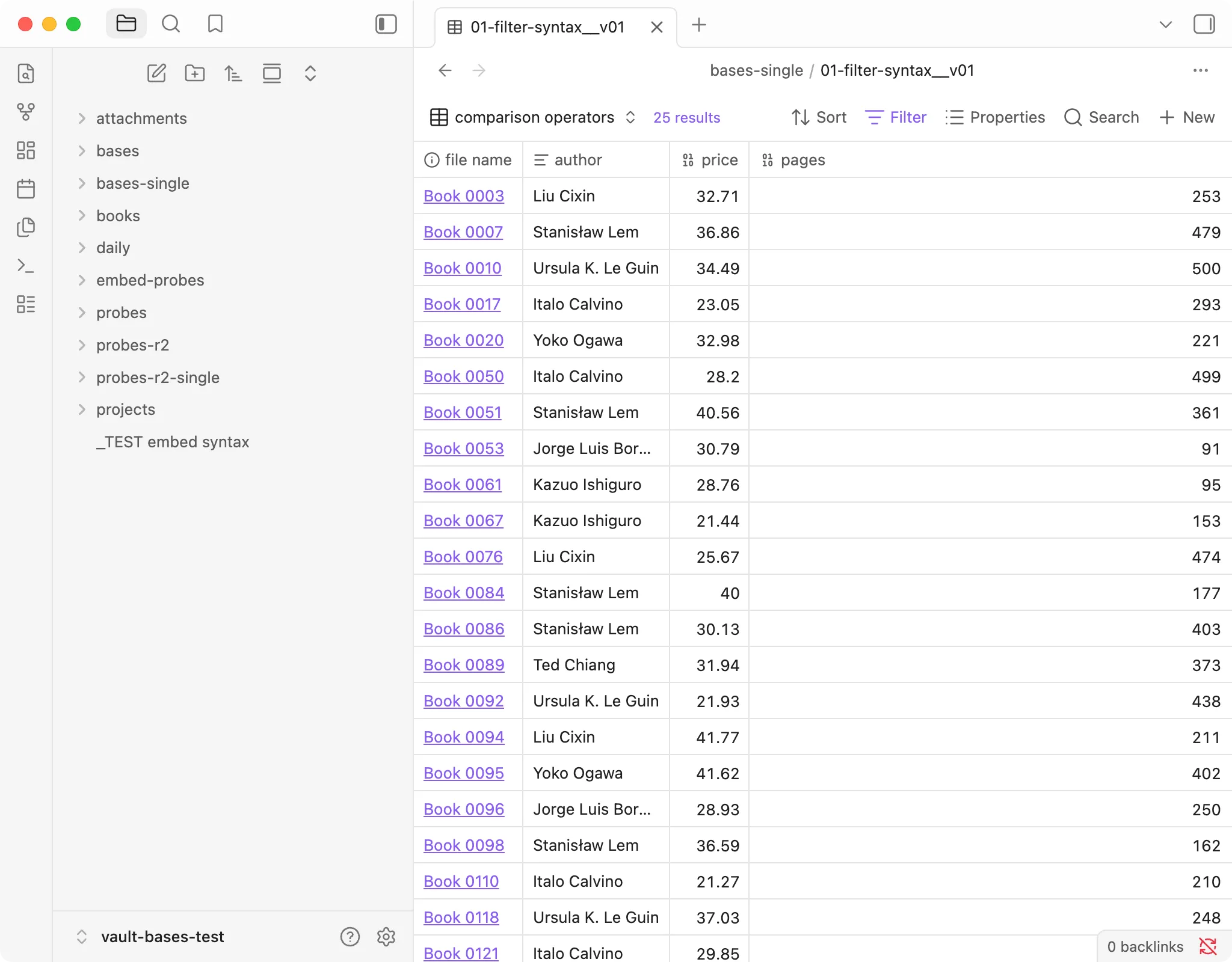
Obsidian 1.13.7, macOS. The filter matches 146 books; the toolbar says 25, because the view has limit: 25.
This matters more than it sounds. If you are debugging a filter, the count is the
first thing you look at. You write a filter, you see a plausible number, you move on.
I hit this in three unrelated places in one afternoon: here, again in the Dataview
comparison views (true counts 201 and 156, both shown as “20 results” under
limit: 20), and a third time with an embedded base (37 actual matches, displayed
as “10 results”).
If you want the count to mean what you think it means, set limit higher than any
plausible result. My control views use limit: 700 and limit: 900 for exactly
this reason — otherwise the control group is fake too, and everything downstream of
it is unverifiable.
The control group, and why you want one
Before trusting any of the numbers below, I ran a view with the file scope but no view-level filter at all:
filters:
  and:
    - file.inFolder("books")
    - 'status != "abandoned"'
views:
  - type: table
    name: "Control: no view filter"
    order: [file.name, note.status]
    limit: 700
Expected 597. Got 597.
That single number is what makes the rest of the page worth reading. Without it, an empty result tells you nothing — you cannot distinguish “the syntax is wrong” from “the syntax is right and nothing matched” from “the folder path is wrong and the scope is empty.”
I am belaboring this because I got caught by it anyway. See the last section.
What actually works
Everything in this table was run and produced a count I had independently computed. None of it is copied from documentation.
| Syntax | Status | Verified by |
|---|---|---|
== != > < >= <= | Works | Comparison view, and all six nesting levels |
and / or / not, arbitrarily nested | Works — correct to six levels deep | See nesting section |
file.inFolder("books") | Works | Three separate control groups: 597, 800, 120 |
file.hasTag("memory") | Works | 156 matches |
file.hasLink("Book 0731") | Works, exact | 2 expected, 2 returned |
file.ext == "pdf" | Works | 21 expected, 21 returned |
file.mtime with now() and duration("7d") | Works, precise to the minute | See the boundary test |
today() | Works | 8 expected, 8 returned |
contains() | Works, but has three different meanings | Covered in its own article |
.round() in a formula | Works | (file.size / 1024).round(1) |
.lower() | Works but pointless — contains() already ignores case |
A note for anyone arriving from Dataview: contains() is not one function with one
behaviour. On a text property it does substring matching. On a list property it
matches whole elements — searching a tag list for fiction will not match
nonfiction, which is the opposite of what almost everyone expects. On a number
property it throws. That deserves its own page and gets one.
What errors out, and what fails silently
Errors are useful. Silent failures are what cost you an evening.
| What I wrote | What happened |
|---|---|
contains() on a Number property | Error toast: Failed to evaluate a filter: Cannot find function “contains” on type Number. The other rows still show. |
| Embedded a view name that doesn’t exist | Orange text inside the embed: View “Longones” not found. 0 results. |
Embedded a base without the .base extension | Treated as a link to a note that doesn’t exist yet: “03-embed-target” is not created yet. Click to create. |
A ```bases code fence (one letter too many) | Nothing. No error. Renders as a plain code block. |
That last row is the one to remember. The correct fence is ```base. Write
```bases — a very easy typo, and the plural reads more naturally — and Bases does
not complain, does not warn, and does not render. You get a grey box containing your
own YAML, which looks enough like “something rendered” that you will go looking for
the bug in your filter.
I have not found a way to make it announce itself. The only defence is knowing it exists.
file.* is not restricted to markdown
This one produced a wrong answer that looked like a right answer.
I ran the standard “modified in the last 7 days” filter with no extension restriction:
filters:
  'file.mtime >= now() - duration("7d")'
It returned 1,641. The complementary filter (< instead of >=) returned
140. They sum to 1,781.
My vault contains 1,616 markdown notes. 1,781 is the count of every file —
notes plus 165 PDFs, PNGs, WebPs, CSVs, and text files, plus the .base files
themselves. Restricted to markdown, the correct answer was 1,476.
So the filter was over-matching by 165 files, and the only visible symptom was a number slightly larger than expected. Nothing errored. Nothing looked broken. If I had not computed 1,476 beforehand, I would have written this page saying it worked.
If you want notes only, say so:
filters:
  and:
    - 'file.ext == "md"'
    - 'file.mtime >= now() - duration("7d")'
Dataview users are the most exposed here, because Dataview’s default source is markdown files and the habit carries over silently.
The same thing bites in the other direction when managing attachments: .base files
are ordinary vault files as far as Bases is concerned. A file.ext != "md" filter
returned 165, which was 120 real attachments plus 45 of my own .base files.
Time filtering is exact, not rounded to days
Worth stating plainly because it’s the sort of thing people assume goes wrong.
I planted ten files with modification times two minutes apart, straddling the seven-day line: five at 09:59 and five at 10:01 on the same day. Then queried the window between eight and six days ago:
filters:
  and:
    - 'file.mtime >= now() - duration("8d")'
    - 'file.mtime < now() - duration("6d")'
Expected 30 files. Got 30 files, and the individual filenames matched. No rounding to whole days, no timezone drift.
Nesting: six levels, no failures
I had expected to find a depth where things break, so I built views that went one level deeper each time and computed each answer separately.
| Depth | Structure | Expected | Bases returned |
|---|---|---|---|
| 1 | single condition | 201 | 201 |
| 2 | and of two | 73 | 73 |
| 3 | and > or | 145 | 145 |
| 4 | and > or > and | 105 | 105 |
| 5 | and > not > or > and | 645 | 645 |
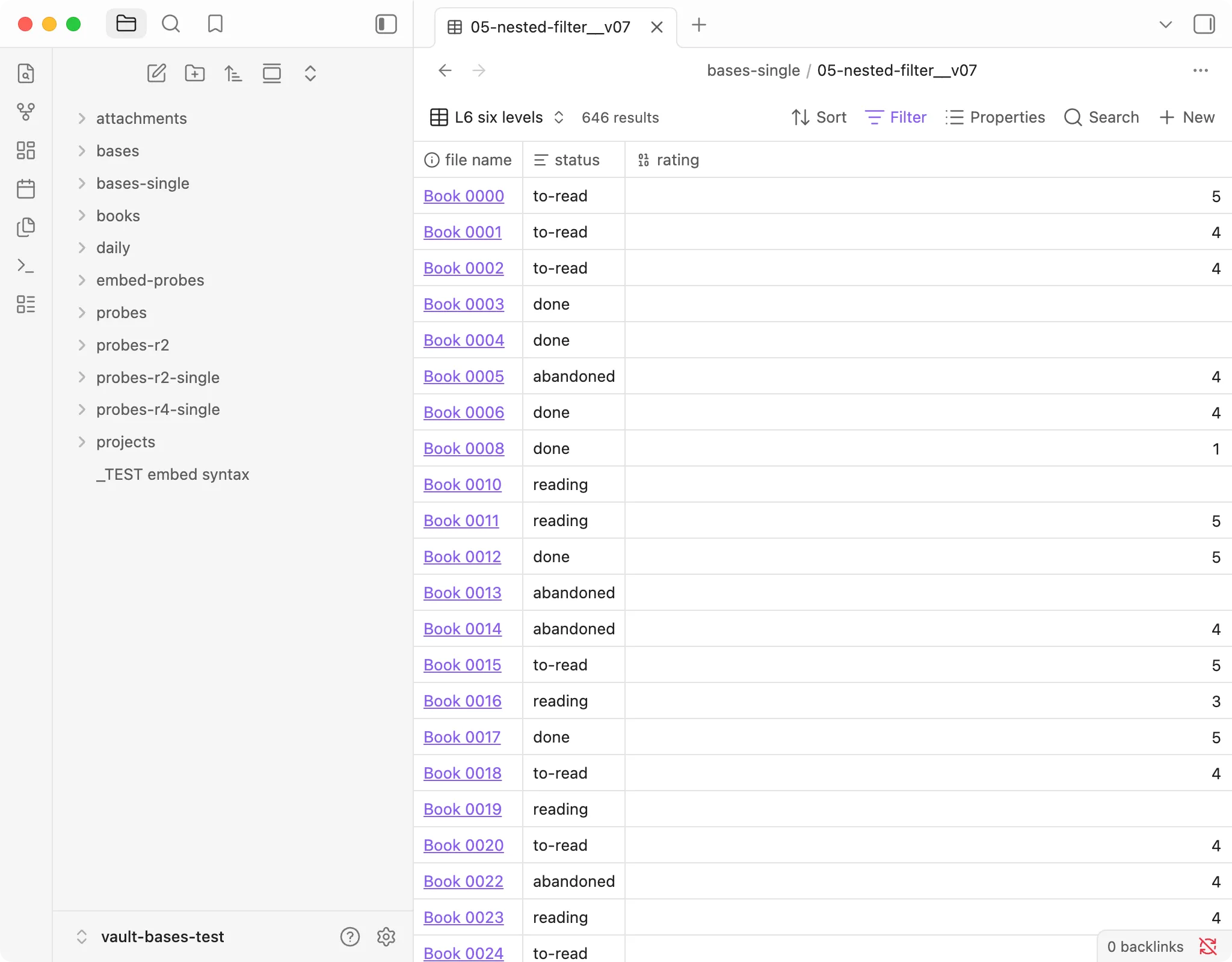
| 6 | and > not > and > or | 646 | 646 |
Six levels, seven views, every count exact, no errors. not wrapping a whole or
block negates the block, not just its first child — which is the specific thing I
was expecting to find broken.
The part where I was wrong twice
Two of my views disagreed with my reference answers. Both times I was the problem, and both times the failure mode is worth more than the result.
My reference numbers went stale mid-experiment. I had written down “1,466 files modified in the last 7 days” earlier in the session. By the time I ran the view, I had split seven base files into thirty-eight, so the vault had thirty-eight more files in it. The reference was correct when written and wrong when used. If you are checking a tool against computed answers, compute them at the same moment as the run.
My test data didn’t contain what my filter looked for. A set of embedded views
all returned zero rows. I very nearly wrote “embedding doesn’t work.” The filter was
file.hasTag("book") — and there is no book tag anywhere in that vault. The real
tags are networks, systems, maps, and seven others. Changed it to systems:
37 rows, immediately.
Zero rows is not evidence. It is the absence of evidence, and it looks identical whether the tool is broken, the syntax is wrong, or your filter is asking for something that was never there. This is what the control group is for.
There is a third one, and it’s the most embarrassing, because I wrote it down as a rule and then used the rule to judge Bases.
In the comments of my nesting test file I had written: “deeper nesting should only
ever narrow the results — if a level suddenly returns more, that level isn’t working.”
It sounds like sound reasoning. It is wrong. Levels 5 and 6 contain not. Negation
increases result counts; that has nothing to do with depth. Monotonic narrowing only
holds when you are adding and conditions.
Had I trusted my own rule, I would have reported a completely correct result as a bug. Plausible-sounding verification rules are their own category of hazard, and this one is exactly the kind of thing that gets written confidently on pages like this one.
Who this is for
Use Bases if you mainly filter, sort, and display notes by their properties. All of that is solid, it is a core feature with nothing to install, and the nesting is trustworthy well past the depth anyone actually writes.
Be careful if you rely on reading the result count to confirm a filter is
correct. Raise every limit above your expected total, or the number will quietly
mislead you.
Check your frontmatter first if your vault has inconsistent property types. A single note with a numeric value where every other note has text is enough to put an error toast on every view that touches that property — and it will look like the view is broken rather than the data.
Tested on the version in the box at the top of this page. Bases moves quickly; if you are reading this well after the tested date, verify against your own install before trusting the specifics.