Tampermonkey Auto Click Every 5 Seconds: 6 Cases I Tested
The script everyone starts with is four lines: setInterval, querySelector,
click(), 5000. It works on a plain button. On real sites it often clicks once and
then goes quiet, or keeps “clicking” while nothing happens, or never stops.
I tested it on Tampermonkey 5.5.0 in Chrome 154 against a local test page with
six kinds of buttons: a normal one, one that React-style code replaces after every
click, one that is disabled for 7 seconds after a click, one that only reacts to
real user clicks, one that only listens for mousedown, and one that submits a form
and reloads the page. The page counts every click it actually receives, so you can
compare what the script thinks it did with what the page saw.
Short answer (Tampermonkey 5.5.0, Chrome 154, tested 2026-09-25):
| What you see | Cause | Fix |
|---|---|---|
| Nothing happens at all | Chrome’s Allow User Scripts toggle is off | Turn it on |
| First click, then nothing (no error) | You saved the button once; the page replaced it | Look the button up again on every tick |
| Some clicks are skipped | The button was disabled at that moment | Poll often, click when it’s enabled |
| Script logs clicks, page ignores them | The page checks event.isTrusted | Not fixable from a userscript |
click() does nothing on a menu | The page listens for mousedown, not click | Dispatch the full mouse event sequence |
| “Stop after 3” never stops | The page reloads and your counter resets | Store the counter with GM_setValue |
| Only one click per minute | The tab is in the background | Keep the tab visible |
If your script doesn’t run at all, check the Allow User Scripts toggle first. I covered that step with screenshots in Tampermonkey script can’t find the element. By default it is off in Chrome 138 and later, and Tampermonkey only shows a banner on its dashboard.
The basic script
// ==UserScript==
// @name         Auto click every 5s
// @match        https://example.com/*
// @grant        none
// ==/UserScript==

setInterval(() => {
  const btn = document.querySelector('#go-btn');
  if (btn) btn.click();
}, 5000);
Replace @match with your page and #go-btn with your button’s selector (right-click
the button, Inspect, then right-click the element in the Elements panel and
choose Copy > Copy selector).
On a normal button this clicked at 5.0, 10.0 and 15.0 seconds after the page
started loading, exactly 5 seconds apart in a visible tab (132 clicks in 11 minutes,
every gap 5 seconds). Note that the first click comes after 5 seconds, not right
away: setInterval waits one full interval before the first run.
The important detail is that querySelector is inside the timer. The first
problem below is what happens when it isn’t.
Case 1: the first click works, then nothing
A very common variant looks up the button once and reuses it:
const btn = document.querySelector('#go-btn');   // looked up once
setInterval(() => {
  btn.click();
}, 5000);
On my “re-render” test page, which replaces the button with a new one after each
click (the way a React or Vue list does when its data changes), the page counted
one click. The script kept calling click() every 5 seconds, with no error in
the console:
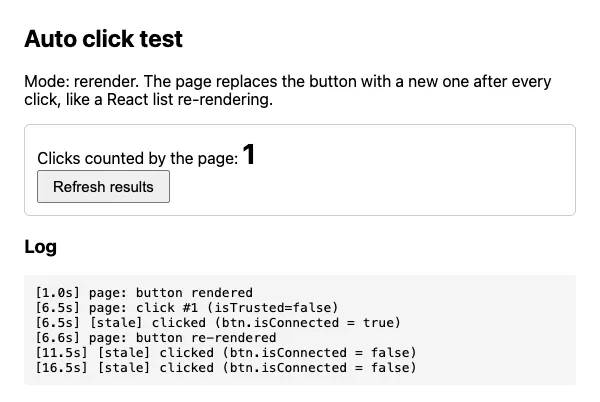
btn.isConnected = false is the giveaway: the script is clicking an old button
that is no longer on the page. The page never hears about it.
How badly this fails depends on how the page listens. When I attached the page’s
click handler directly to the button, the old button still counted clicks (3 of 3),
because the handler lives on the button object and still runs after the button is
removed from the page. When the
page listened on document, which is how React 17 and later attach events (to the
root container), the old button counted nothing. So a script like this can work
on one site and silently fail on another.
Fix: call querySelector inside the timer, as in the basic script. With that
change the same re-render page counted 3 clicks in 17 seconds.
Case 2: some clicks are skipped
Many buttons disable themselves while a request is running. On my “cooldown” page the button is disabled for 7 seconds after each click. The basic script clicked at 5 seconds (counted), at 10 seconds (button disabled, no click event at all, not even an error), and at 15 seconds (counted):
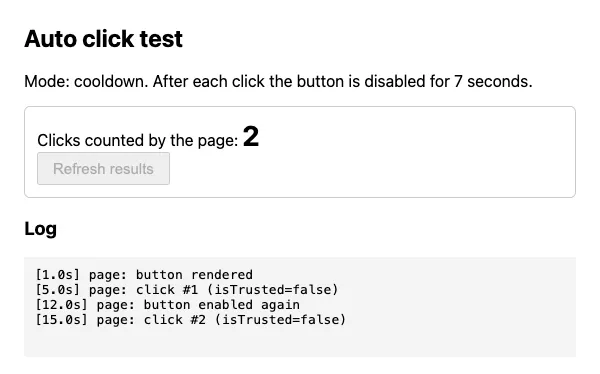
Calling click() on a disabled <button> does nothing. Your 5-second timer and the
page’s cooldown drift in and out of step, so you get a click every 10 seconds, or
every 15, depending on the timing.
Checking btn.disabled and skipping makes the script honest (it logged “button
disabled, skipping” at 10 and 20 seconds) but still loses those turns. What worked
better was checking often and clicking as soon as the button is ready, with at
least 5 seconds between clicks:
let last = 0;
setInterval(() => {
  const btn = document.querySelector('#go-btn');
  if (!btn || btn.disabled) return;
  if (Date.now() - last < 5000) return;
  last = Date.now();
  btn.click();
}, 500);
On the same cooldown page this clicked at 1.1, 8.6 and 16.1 seconds: each time within half a second of the button being enabled again, 3 clicks in 16 seconds instead of 2.
Some sites fake a disabled state with a CSS class (is-disabled, aria-disabled="true")
instead of the real disabled attribute. Check the button in the Elements panel
and add that condition if needed.
Case 3: the script clicks, the page ignores it
Every click a userscript makes has event.isTrusted === false. Only real mouse and
keyboard input from the user is trusted. A page can check this and ignore
everything else, and my “trusted” test page does:
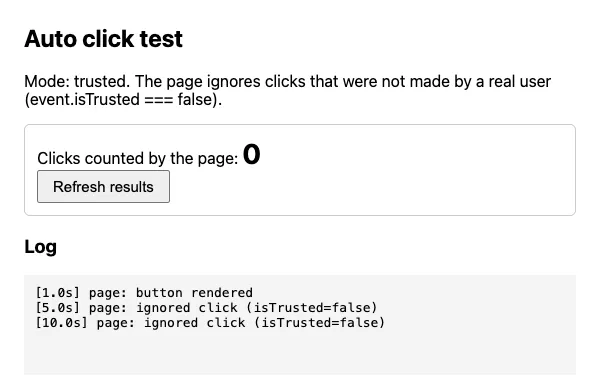
I didn’t find a way around this from a userscript, and there isn’t a setting in
Tampermonkey for it: click(), dispatchEvent with a MouseEvent, and the full
pointer/mouse event sequence from Case 4 all arrived with isTrusted=false in my
tests. If a site does this, it is deliberately blocking automated clicks, and an
auto-clicker is probably against its terms anyway.
Case 4: click() does nothing on menus and some games
element.click() fires only a click event. Some menus, drag handles and browser
games react to mousedown or pointerdown instead. On my “mousedown” test page the
basic script ran every 5 seconds and the page counted 0:
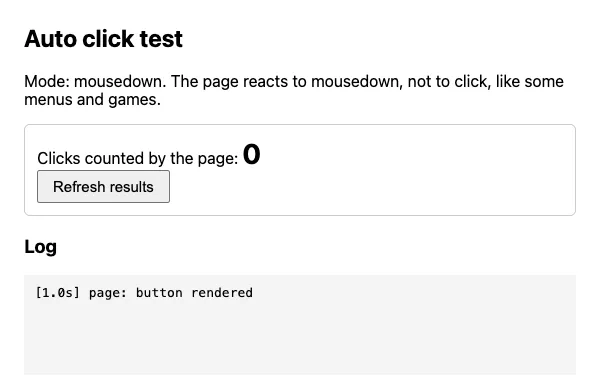
Sending the whole sequence of events that a real click produces fixed it:
function realClick(el) {
  for (const type of ['pointerdown', 'mousedown', 'pointerup', 'mouseup', 'click']) {
    const Ev = type.startsWith('pointer') ? PointerEvent : MouseEvent;
    el.dispatchEvent(new Ev(type, { bubbles: true, cancelable: true, view: window }));
  }
}

setInterval(() => {
  const btn = document.querySelector('#go-btn');
  if (btn) realClick(btn);
}, 5000);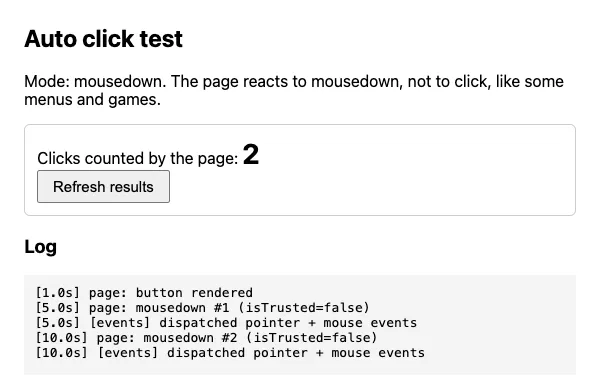
On a normal button, realClick still counted as exactly one click per tick (4
clicks in 21 seconds), so it’s safe to use everywhere. It won’t help with Case 3:
these events are not trusted either.
Case 5: “stop after 3 clicks” never stops
If the button submits a form or otherwise reloads the page, your whole script starts over after every click, including its variables. This version is meant to stop after 3 clicks:
let clicks = 0;
const timer = setInterval(() => {
  if (clicks >= 3) return clearInterval(timer);
  clicks++;
  document.querySelector('#go-btn')?.click();
}, 5000);
On my “reload” page it never did. The log for 31 seconds, one block per page load:
[limit-memory] script starts, clicks = 0
[limit-memory] clicking, clicks = 1
page: form submitted, reloading
[limit-memory] script starts, clicks = 0
[limit-memory] clicking, clicks = 1
page: form submitted, reloading
...
The counter was back to 0 on every load; the page had been submitted 6 times when I stopped the test, and it would have kept going.
Fix: store the counter with GM_setValue, which Tampermonkey keeps across page
loads. You need to grant both functions in the header:
// ==UserScript==
// @name         Auto click - stop after 3
// @match        https://example.com/*
// @grant        GM_getValue
// @grant        GM_setValue
// ==/UserScript==

const timer = setInterval(() => {
  const clicks = GM_getValue('clicks', 0);
  if (clicks >= 3) return clearInterval(timer);
  GM_setValue('clicks', clicks + 1);
  document.querySelector('#go-btn')?.click();
}, 5000);
Result on the same page: stored clicks 1, 2, 3 across three reloads, then “limit reached, stopped” on the fourth load. The page counted 3 submits.
The catch: the stored value never resets by itself. The next time you open the page,
the script sees 3 and does nothing. If you want “3 per day”, put the date in the key,
for example 'clicks-' + new Date().toDateString() (I didn’t run this across a
real day change).
Adding @grant lines also runs your script in Tampermonkey’s sandbox instead of the
page, so page variables like window.someAppObject need unsafeWindow.someAppObject.
I show that difference in the
SPA section of the element article.
Case 6: in a background tab it clicks once a minute
I opened two tabs with the basic script and left them for 11 minutes: one visible, one in the background.
| Tab | Clicks | Gap |
|---|---|---|
| Visible | 132 | 5 s |
| Background | 22 | 5 s, then 60 s |
(In the background tab the gap was 5 seconds for the first 56 seconds only.)
The background tab clicked at 6.1, 11.1 … 56.1 seconds, then at 79.1, 139.1,
199.1, 259.1 and so on, once a minute. That is Chrome throttling timers in hidden
tabs to save battery, and a userscript can’t opt out of it: setInterval,
setTimeout and the polling pattern from Case 2 are all timers.
In my headless test the switch to one per minute happened after about a minute in the background. The exact point may be different in a normal Chrome window, and other browsers throttle differently. What to do:
- Keep the tab you’re automating visible. A separate window works if it isn’t minimized or covered (I tested windows being visible in headless mode, not window covering on a real desktop).
- Don’t rely on exact timing in the background. If “every 5 seconds” matters, the tab has to stay in front.
What I’d do
- Check the Allow User Scripts toggle before debugging anything else.
- Look up the button inside the timer, every time.
- Check
disabled(or the site’s disabled class) and poll every 500 ms instead of blindly clicking every 5 seconds. - If
click()does nothing, try therealClicksequence. - If the page reloads, keep any counter or on/off state in
GM_setValue. - If the page ignores even
realClickand logsisTrusted, stop: the site is blocking automation on purpose.
And be reasonable with it. Auto-clicking a “refresh” button on your own dashboard is fine; hammering someone else’s site every 5 seconds can get you rate-limited or break its terms of service.
Test setup and what this doesn’t cover
- Tampermonkey 5.5.0, the version the Chrome Web Store update server delivered
for Chrome 154 on 2026-09-25. I downloaded the package, checked that its signature
and extension ID match the store listing (
dhdgffkkebhmkfjojejmpbldmpobfkfo), and loaded it unpacked into a separate Chrome test profile. A normal install from the Chrome Web Store can behave differently, for example in how the Allow User Scripts toggle is set after installing. - Chrome 154.0.8037.57 in headless mode on macOS 15.3.1. Background throttling in particular may differ in a normal Chrome window. Not tested: Firefox, Edge, Safari, Violentmonkey, Greasemonkey.
- All pages were local test pages that I wrote to reproduce each case, not real sites. Real sites combine these cases, for example a React button that is also disabled while loading.
- Default Tampermonkey settings, except the interface language, which I set to English.